
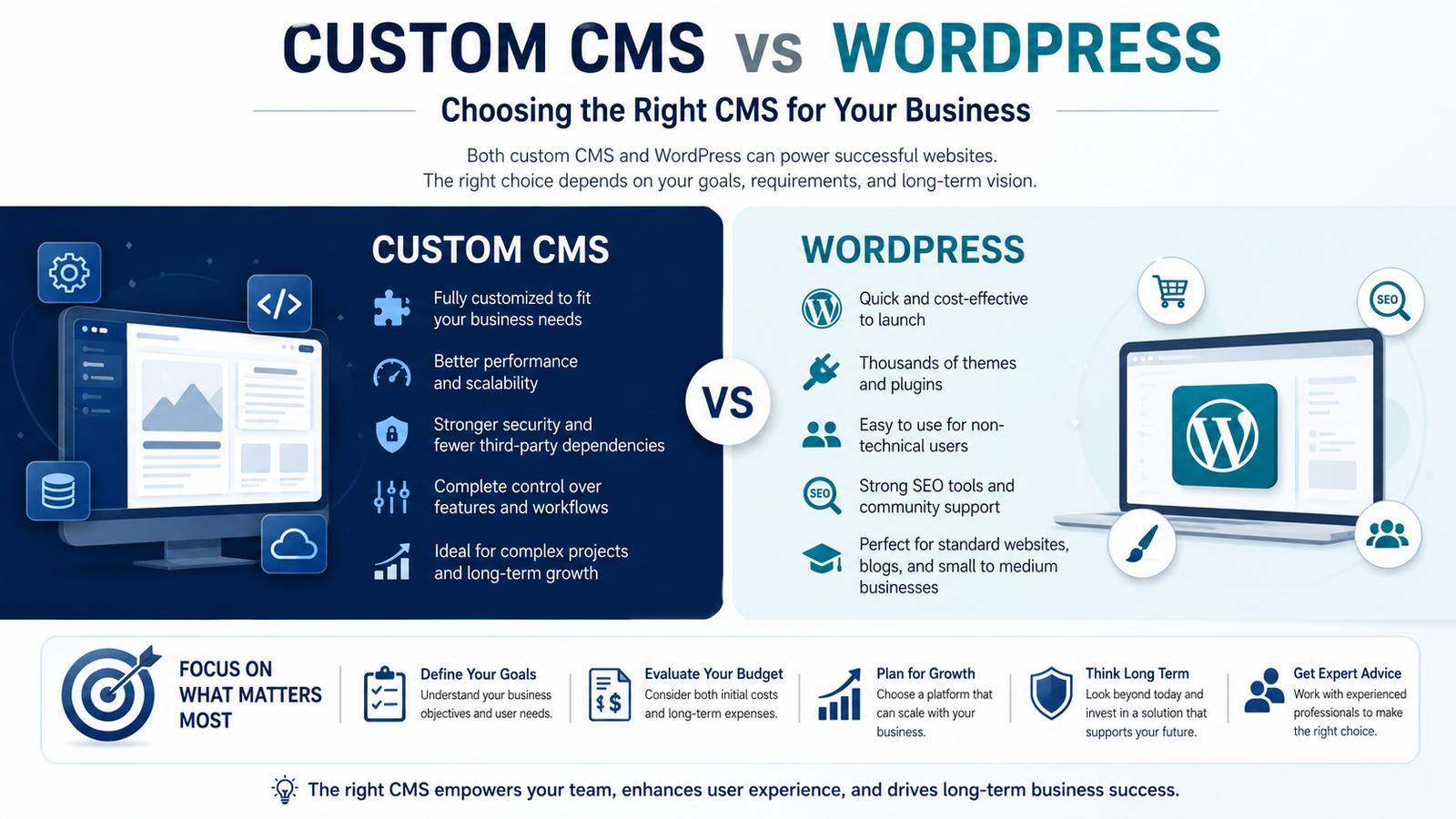
Custom CMS vs WordPress: A Developer's Perspective
Understanding CMS Platforms and Why Your Choice Matters
A content management system (CMS) is the software that allows you to create, organize, and publish content on your website without having to edit code for every change. While WordPress is the most widely recognized CMS, it represents only one of many available solutions. If you're comparing a custom CMS vs WordPress, understanding the strengths and limitations of each approach is essential before making a long-term investment. Whether you're launching a new website or upgrading an existing one, the platform you select will influence everything from performance and scalability to content management, search engine visibility, and long-term operating costs.
Selecting the wrong CMS can create significant challenges down the road. Companies sometimes adopt WordPress for projects that require a higher degree of customization, only to encounter limitations as their requirements grow. On the other hand, some organizations invest in a fully custom-built solution when an established CMS would have met their needs perfectly, resulting in unnecessary development and maintenance expenses.
The right choice depends on your goals, budget, technical requirements, and future plans. Taking the time to evaluate your options carefully can save both time and money while providing a stronger foundation for long-term growth.
Where WordPress Excels
WordPress remains one of the most popular website platforms in the world, and for good reason. Its widespread adoption has created a massive ecosystem of developers, themes, plugins, and educational resources. This makes it an attractive option for businesses looking to launch a professional website without investing in a fully custom solution. In any custom CMS vs WordPress comparison, this mature ecosystem is one of WordPress's strongest advantages.
For websites with common requirements—such as informational pages, blogs, contact forms, portfolios, or basic online stores—WordPress offers a practical balance between functionality, ease of use, and cost. It allows business owners and content teams to manage and update their websites without requiring advanced technical knowledge.
One of WordPress's biggest advantages is its extensive plugin ecosystem. Features that would otherwise require custom development can often be added with just a few clicks. Search engine optimization tools, appointment booking systems, payment processing, customer relationship management integrations, email marketing platforms, membership areas, and analytics solutions are all readily available through existing plugins.
For small and medium-sized businesses, this flexibility can dramatically reduce development time and costs. Instead of building every feature from scratch, companies can leverage proven solutions that are already tested, documented, and widely supported by the WordPress community.
The Challenges of Using WordPress
While WordPress is an excellent solution for many websites, it is not the ideal choice for every project. As business requirements become more complex, the platform's limitations can become increasingly apparent. Features that initially seem easy to implement may require multiple plugins, custom modifications, and ongoing maintenance, adding complexity over time. This is where the custom CMS vs WordPress debate becomes especially relevant, as projects with unique requirements often outgrow the flexibility of a plugin-based approach.
Performance is often one of the first areas affected. As a website grows in traffic, content volume, and functionality, WordPress can become more demanding on server resources. Websites that rely on numerous plugins and custom integrations may experience slower load times and require extensive optimization efforts to maintain acceptable performance. In some cases, developers spend more time working around platform constraints than building new features.
Security is another factor that deserves careful consideration. Due to its popularity, WordPress is one of the most frequently targeted website platforms on the internet. Maintaining a secure installation requires regular updates, ongoing vulnerability monitoring, and careful evaluation of third-party plugins and themes. While these tasks are manageable, they represent an ongoing responsibility that should not be overlooked.
For organizations with highly specific requirements, advanced workflows, or long-term scalability goals, these challenges can make WordPress less attractive than a more tailored solution designed around the project's unique needs.
When a Custom CMS Is the Better Choice
A custom CMS becomes a strong option when a project's requirements go beyond the capabilities of off-the-shelf platforms. While many websites can be successfully built with WordPress, some businesses need greater flexibility, deeper customization, and more control over how content is managed and delivered. In the custom CMS vs WordPress discussion, this is the point where a tailored solution often begins to deliver greater long-term value.
This is particularly true for platforms that rely on complex content models, advanced user permissions, specialized business processes, or extensive integrations with third-party systems such as CRM, ERP, or internal enterprise applications. In these situations, a custom-built CMS can provide a cleaner, more efficient solution that is designed specifically around the organization's workflows rather than forcing those workflows to adapt to the limitations of a general-purpose platform.
A related discussion is the comparison between headless CMS solutions and traditional WordPress implementations. In a headless architecture, the content management layer is separated from the user-facing frontend. This allows developers to build modern web applications using the technologies that best fit the project while maintaining a dedicated system for content management behind the scenes.
The benefits of this approach often include improved performance, greater scalability, enhanced flexibility, and a more maintainable codebase. Teams can create highly customized user experiences without being constrained by the presentation layer of a traditional CMS.
The primary drawback is that custom and headless solutions typically require a larger initial investment. Development takes longer, and businesses cannot rely on the extensive library of plugins and themes available in ecosystems such as WordPress. However, for projects with demanding technical requirements or ambitious long-term goals, the additional investment can deliver significant advantages in flexibility, efficiency, and future growth.
Comparing Speed and Performance
Website performance plays a critical role in both user satisfaction and search engine visibility. Faster websites provide a better browsing experience, improve engagement, and can contribute positively to search rankings. For this reason, performance should be a key consideration when evaluating a CMS platform. When comparing a custom CMS vs WordPress, performance is often one of the most important factors businesses evaluate.
In many cases, custom-built and headless CMS solutions have a natural advantage when it comes to speed. Because they are designed around specific project requirements, they avoid much of the additional code, dependencies, and plugin overhead commonly found in traditional CMS platforms. This often results in leaner applications, faster page loads, and more efficient use of server resources.
WordPress is fully capable of delivering strong performance, but achieving and maintaining that performance typically requires careful planning. Factors such as theme quality, plugin selection, caching strategies, database optimization, and hosting infrastructure all play an important role. Without proper management, performance can gradually decline as additional functionality is added over time.
For websites that handle large amounts of traffic, rely on complex real-time functionality, or serve highly dynamic content, a custom solution can offer meaningful performance benefits and greater scalability. However, for most small to medium-sized business websites, a professionally developed and well-optimized WordPress installation will generally provide more than enough speed to meet user expectations and business objectives.
Long-Term Maintenance Considerations
The differences between WordPress and a custom CMS often become more noticeable over time, particularly when it comes to maintenance and operational costs. While the initial development budget is important, the long-term effort required to keep a website running smoothly can have an even greater impact on the total cost of ownership. In a custom CMS vs WordPress comparison, long-term maintenance is often one of the deciding factors for growing businesses.
With WordPress, maintenance is an ongoing responsibility. The platform itself, along with its themes and plugins, receives regular updates that must be applied to ensure compatibility, performance, and security. Routine tasks such as monitoring vulnerabilities, managing backups, testing updates, and resolving conflicts between plugins are all part of maintaining a healthy WordPress installation.
When these tasks are ignored, problems can accumulate quickly. Outdated components may cause functionality issues, create security risks, or introduce compatibility problems that affect the user experience. As a result, WordPress websites require consistent attention to remain stable and secure.
A custom CMS often follows a different maintenance model. Because the platform is built specifically for the project's requirements, it typically relies on fewer third-party dependencies and has a more controlled architecture. Updates are planned according to business needs rather than being driven by a constant stream of external plugin releases. This can reduce the frequency of maintenance activities and simplify long-term system management.
However, this approach comes with its own trade-off. New features, modifications, and enhancements generally require development work rather than the installation of an existing plugin or extension. For organizations that already work with a trusted development team, this is rarely a concern. For businesses that prefer to manage every aspect of their website independently, it is an important factor to weigh when choosing between a custom solution and a more flexible platform like WordPress.
SEO Considerations for WordPress and Custom CMS Platforms
Search engine optimization is often a major factor when selecting a CMS, but it is important to understand that Google does not rank websites based on the platform they use. A well-built WordPress website can perform exceptionally well in search results, just as a custom CMS can. Ultimately, SEO success depends on the quality of the implementation, content strategy, technical optimization, and ongoing maintenance. When evaluating a custom CMS vs WordPress, the real SEO advantage comes from how well the platform is built and maintained rather than the CMS itself.
That said, the choice of CMS can influence how easily certain SEO best practices are implemented and maintained over time.
WordPress SEO Advantages
WordPress is widely recognized for its strong SEO ecosystem. Businesses and content teams can access powerful optimization tools without requiring extensive technical knowledge.
Key benefits include:
- Access to mature SEO plugins such as Yoast SEO and Rank Math
- Easy management of page titles, meta descriptions, and social sharing metadata
- Automated XML sitemap generation
- Built-in support for structured content and SEO workflows
- Large community support and extensive documentation
These tools make it possible for non-technical users to handle many day-to-day SEO tasks without developer involvement.
SEO Benefits of a Custom CMS
A custom CMS takes a different approach. Rather than relying on third-party plugins, SEO functionality is built directly into the platform according to the project's specific requirements.
Potential advantages include:
- Fully customized SEO architecture tailored to business goals
- Greater control over URL structures, metadata, schema markup, and indexing rules
- Cleaner codebases with fewer unnecessary scripts and dependencies
- Better integration between content management and technical SEO requirements
- More predictable performance across the entire platform
While these features require additional development effort upfront, they can provide a highly optimized foundation for long-term growth.
Performance and Technical SEO
Website speed remains an important ranking factor, and this is an area where custom solutions often have an advantage.
Common performance-related benefits of custom builds include:
- Reduced code overhead
- Fewer third-party dependencies
- Faster page rendering
- Improved scalability under heavy traffic
- Greater flexibility for advanced caching and optimization strategies
WordPress can also achieve excellent performance, but it typically requires more careful optimization and ongoing monitoring.
Potential SEO Challenges
Regardless of the platform chosen, poor implementation can negatively affect search visibility.
With WordPress, common issues include:
- Duplicate content generated by plugins or taxonomies
- Excessive JavaScript and CSS loading
- Plugin conflicts that impact crawlability
- Redirect chains created by multiple SEO tools
- Performance degradation caused by unnecessary extensions
With a custom CMS, challenges may include:
- Missing SEO functionality if it is not planned during development
- Additional development costs for advanced SEO features
- Greater reliance on developers to implement technical improvements
In the end, both WordPress and custom CMS platforms can achieve excellent search rankings. The most important factor is not the platform itself, but how effectively it is designed, optimized, and maintained over the life of the website.
Evaluating Costs Over the Long Term
One of the most common misconceptions when comparing CMS platforms is focusing solely on the initial development budget. While upfront costs are important, they represent only part of the overall investment. A more meaningful comparison considers the total cost of ownership over several years. In the custom CMS vs WordPress debate, long-term costs are often more important than the initial price of development.
WordPress is often the more affordable option at the beginning of a project. Development can be completed quickly, and many features are available through existing themes and plugins. However, ongoing expenses such as plugin subscriptions, security management, hosting upgrades, maintenance services, and performance optimization can gradually increase the overall cost.
A custom CMS generally requires a larger initial investment because the platform is designed and developed specifically for the project's needs. In return, businesses often benefit from a more controlled environment with fewer third-party dependencies, reduced complexity, and lower long-term maintenance requirements. This can help minimize unexpected costs and provide greater predictability as the platform evolves.
Rather than asking which solution is less expensive to launch, businesses should consider which option offers the best value over the lifespan of the website. The true measure is not the initial price tag, but the total cost of maintaining, improving, and scaling the platform over time.
A Practical Framework for Choosing the Right CMS
The best CMS is not necessarily the most popular or the most advanced—it is the one that aligns with your business goals, technical requirements, and growth plans. Ultimately, the custom CMS vs WordPress decision should be based on your current needs and where you expect your business to be in the years ahead.
As a general guideline, WordPress is often the right choice when:
- You need a professional website with standard functionality
- Budget is a primary consideration
- Speed of deployment is important
- Content will be managed by non-technical users
- The project relies on common features that can be supported by existing plugins
A custom or headless CMS may be a better fit when:
- Your content model is highly structured or complex
- Website performance is a critical business requirement
- Advanced integrations with third-party systems are necessary
- You need complete control over workflows and functionality
- Significant traffic growth or platform expansion is expected
A fully custom CMS is often the preferred option when:
- You are building a digital product rather than a traditional website
- The platform includes unique business logic or specialized user experiences
- Off-the-shelf solutions would require extensive customization
- Long-term flexibility and scalability are strategic priorities
If the best option is not immediately obvious, seeking advice from an experienced developer or CMS consultant can be valuable. A good technology partner will evaluate your objectives, technical constraints, and future plans before recommending a solution, ensuring that the platform serves the business rather than forcing the business to adapt to the platform.