Skip to content
The Blog Posts

Tips, Guides &
Ideas for Builders

Thoughts, tutorials, experiments and practical notes about software engineering, automation, SEO, APIs, CMS architecture and building digital products.

Blog

Latest Articles

6 articles found

How to Migrate WordPress To Your Custom CMS Without Losing SEO
post
1 min read

How to Migrate WordPress To Your Custom CMS Without Losing SEO

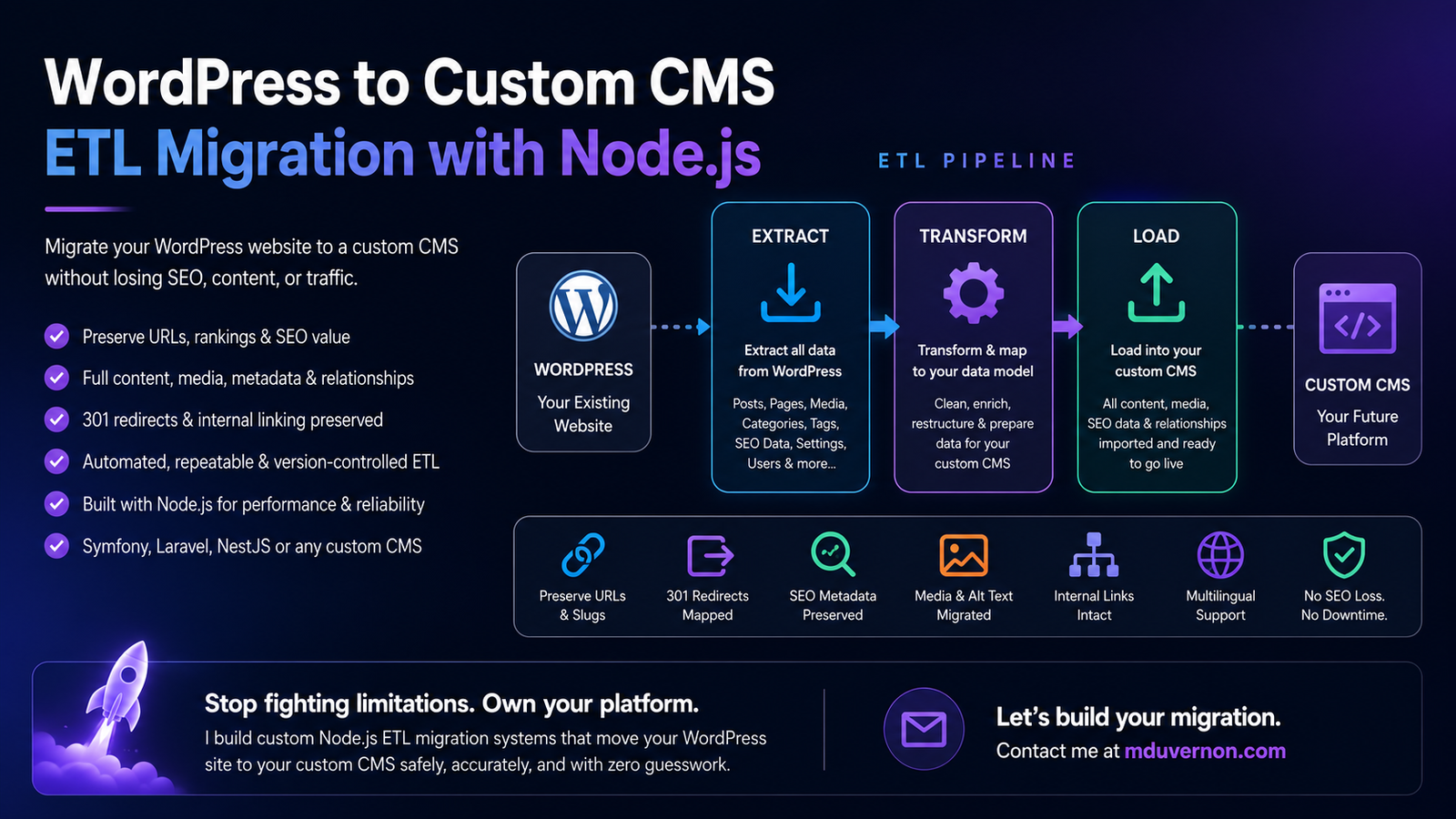
How I Migrated Away From WordPress Without Sacrificing My SEOWhy building my own CMS became one of the best technical decisions I've made.It All Started With Affiliate MarketingA few years ago, I became fascinated by affiliate marketing.Not because I believed it was a shortcut to making money online, but because it combined so many things I genuinely enjoy: software development, SEO, automation, data analysis, and creating useful content.I didn't want to build one successful website. I wanted to build an ecosystem of niche websites, each focused on helping a specific audience while generating organic traffic through search engines and platforms like Pinterest.So I did what almost every developer and blogger does.I started with WordPress.At first, it was exactly what I needed. I could launch a website in a few hours, publish articles, install an SEO plugin, connect analytics, and focus on writing content instead of building infrastructure.I wanted to like WordPress.After all, it's the platform that powers a huge portion of the web, and countless successful businesses rely on it every day.But from the very beginning, something never felt right.As a software developer, I naturally look for simplicity, predictability, and control. Instead, I was greeted by countless settings pages, feature-rich dashboards, endless configuration options, and shiny buttons that promised to solve problems I didn't actually have.Every plugin added another menu.Another settings page.Another layer of abstraction.Another interface to learn.I wasn't looking for a platform that could do everything.I was looking for one that did exactly what I needed.The more I explored WordPress, the more it felt like I was navigating around features built for everyone instead of building software for my own goals.My objective wasn't to become an expert in configuring plugins or discovering the latest page builder.I wanted to write content, automate repetitive work, publish at scale, and have complete control over every aspect of my publishing pipeline.That's when it became obvious.WordPress wasn't the product I wanted to build on.It was simply the starting point that convinced me I needed to build my own CMS instead.WordPress Was Never the End GoalFrom the very beginning, my goal wasn't simply to build a website.I wanted to build SEO-optimized affiliate websites, high-performance blogs, and eventually e-commerce stores that could generate consistent organic traffic and become long-term digital assets. More importantly, I wanted to create a platform capable of supporting multiple projects without constantly reinventing the wheel.At first, WordPress seemed like the obvious choice.For years, it solved a problem I had.It let me publish websites quickly, install plugins, manage content, and get projects online without building an entire publishing platform from scratch.Like many developers, I started there because it was the industry standard.But it didn't take long before I noticed something.I wasn't building my publishing ecosystem anymore—I was maintaining WordPress.Every project gradually turned into a collection of plugins trying to cooperate.One plugin handled SEO.Another managed caching.Another optimized images.Another generated redirects.Another extended the editor.Another improved performance.Every feature seemed to require another dependency.And every update came with the same question in the back of my mind:Is something going to break this time?That wasn't the business I wanted to build.I wanted to spend my time creating content, improving SEO, automating workflows, and growing my portfolio of websites—not maintaining a general-purpose CMS designed to satisfy millions of different use cases.That's when I realized that WordPress had served its purpose.It helped me get started, but it was never the end goal.WordPress Was Never the End GoalWordPress was never the destination.It was simply the fastest way to validate an idea.My goal was never to become a WordPress developer or build websites around a collection of plugins. I wanted to create SEO-optimized affiliate websites, content-driven blogs, and e-commerce stores capable of generating sustainable organic traffic. More importantly, I wanted to build a platform that could scale alongside my ideas instead of limiting them.In the beginning, WordPress did exactly what it was designed to do.It allowed me to publish content quickly, install a few essential plugins, and launch websites without spending months building the underlying infrastructure. For someone who wants to get online fast, it's an excellent starting point.Like many developers, I started with WordPress because it's the obvious choice. It's mature, well documented, and supported by a massive ecosystem.But as I gained experience, I began to notice something that bothered me.I wasn't investing my time into improving my websites.I was investing my time into maintaining WordPress.Every new requirement seemed to introduce another dependency. Need better SEO? Install a plugin. Better caching? Another plugin. Image optimization? Another plugin. Redirect management? Another plugin. Forms, security, backups, schema markup, analytics… the list kept growing.Eventually, my websites stopped feeling like software I owned and started feeling like collections of third-party extensions that happened to work together.Every update became a small gamble.Would a plugin introduce a breaking change?Would two extensions become incompatible?Would a new version silently change how something worked?Those weren't the problems I wanted to spend my time solving.As a software developer, I prefer systems that are intentional, minimal, and easy to reason about. WordPress offers incredible flexibility, but that flexibility comes with countless menus, configuration screens, optional features, and abstractions that simply weren't relevant to the kind of publishing platform I wanted to build.At some point, I realized something important.I wasn't trying to build a better WordPress website.I was trying to build a better publishing system.That realization is what ultimately led me to design my own CMS.The Breaking PointAs my vision became clearer, I realized I wasn't building a single website anymore.I was building a publishing ecosystem.One capable of powering SEO-optimized affiliate websites, content-rich blogs, and eventually e-commerce stores—all sharing the same infrastructure while remaining independent projects.To get there, I needed far more than a traditional CMS.I needed a platform that could support:Automated content publishingAI-assisted content generationMultilingual websitesPinterest and social media integrationsCustom editorial workflowsAutomated image processing pipelinesAffiliate product managementAPI-first communication between servicesContent synchronization across multiple websitesComplete ownership of the data modelEvery new requirement exposed another limitation.It wasn't that WordPress couldn't do these things—it often could.The problem was how it did them.Every feature meant another plugin.Another dependency.Another database schema I didn't control.Another abstraction layer between my code and my business.Instead of designing software around my workflow, I was constantly adapting my workflow to fit WordPress.Eventually, I asked myself a simple question:Why am I forcing my business to fit WordPress instead of building software that fits my business?That question completely changed the direction of the project.But there was one obvious challenge.I already had thousands of pages, articles, images, categories, metadata, and years of SEO work invested in WordPress.Starting over wasn't an option.Neither was manually copying everything into a new CMS.So I approached the migration the same way I would any large software engineering problem.I built an ETL (Extract, Transform, Load) migration system.Instead of thinking about migration as a one-time import, I treated WordPress as a data source.The ETL pipeline would:Extract every piece of content from WordPress—posts, pages, categories, tags, media, menus, SEO metadata, redirects, and relationships.Transform that data into the structure of my own domain model, cleaning inconsistencies, enriching metadata, generating missing fields, and preserving SEO-critical information.Load everything into my custom CMS while maintaining URLs, slugs, internal links, images, and relationships.Because the process was automated, I could run it repeatedly.Every improvement to the migration logic benefited every website.If I discovered a bug, I fixed the ETL—not the content.If I added a new feature to my CMS, I updated the transformation step and migrated again.The migration became deterministic, repeatable, and version-controlled, just like the rest of my software.At that point, WordPress was no longer the platform running my business.It had become just another data provider feeding a system designed specifically for my needs.Why Build a Custom CMS?One of the biggest misconceptions about building a custom CMS is that you're trying to recreate WordPress.That was never my objective.WordPress is designed to solve the publishing needs of millions of websites. It has to support countless industries, workflows, themes, plugins, and user expectations.My CMS only has to solve one problem:Mine.I wasn't looking for a platform that could do everything.I wanted one that did exactly what my business required—and nothing more.That means every feature has a purpose.Every database table exists because I use it.Every API serves a real workflow.Every screen is designed around how I work, not around what a generic website might need.As a result, there's no legacy code to work around.No unnecessary plugins to install.No page builders I'll never use.No endless configuration pages.No features added simply because they might be useful to someone else.The system stays intentionally small, focused, and easy to evolve.More importantly, I own the architecture.If I want to integrate AI into my publishing workflow, I build it.If I need better SEO tooling, I add it directly to the content model.If I want Pinterest automation, affiliate management, or an entirely new publishing workflow, I don't wait for a plugin developer to support it—I design it exactly the way I need it.That's the biggest advantage of building your own CMS.You're no longer adapting your business to someone else's software.You're building software that adapts to your business.Of course, that naturally raises another question:If WordPress already powers millions of websites, why invest the time to build an entirely new CMS?The answer goes far beyond performance or avoiding plugins. It's about architecture, long-term scalability, automation, and complete ownership of the publishing platform.I dive into that journey in a separate article:→ Why I Built My Own CMS Instead of Using WordPressThere, I explain the technical and business decisions behind my CMS, what problems I wanted to solve, why I chose Symfony and React, and why I believe owning your platform can become a long-term competitive advantage for developers building content businesses.The Biggest Fear: Losing SEOThe moment you tell someone you're migrating away from WordPress, the first question is almost always the same:"But what about your SEO?"It's a fair question.After months—or even years—of publishing content, earning backlinks, and climbing the search results, the last thing you want is to lose everything because of a migration.The good news is that migrating to a custom CMS doesn't automatically hurt your SEO.A poorly planned migration does.One of the first things I did before writing a single line of migration code was create a complete inventory of my WordPress website.Every page.Every post.Every category.Every image.Every permalink.Every piece of SEO metadata.I needed to know exactly what already existed before I could recreate it elsewhere.Start by Mapping Every URLURLs are one of your website's most valuable SEO assets.Search engines have already discovered them.They may have backlinks pointing to them.Users may have bookmarked them.Other websites may reference them.Changing URLs without a plan forces search engines to rediscover your content from scratch—and that's a risk you don't need to take.That's why my ETL migration doesn't simply import content.It begins by mapping every WordPress URL to its future destination.For every page in WordPress, I determine one of three outcomes:Keep the exact same URL. This is always the preferred option.Map it to a new URL if the content structure has evolved.Redirect it permanently (301) when a URL genuinely needs to change.This URL mapping becomes the backbone of the migration.It's not an afterthought; it's a first-class piece of data that the ETL pipeline uses throughout the import process.Because every page already has a defined destination before the migration begins, there are no surprises once the new CMS goes live.SEO Is More Than Just URLsA URL is only one part of the equation.A successful migration also preserves everything that gives a page its search value:Meta titles and descriptionsCanonical URLsStructured dataOpen Graph metadataInternal linksImage alt textCategories and taxonomiesPublication datesRedirectsSitemap entriesHreflang information for multilingual websitesThese elements are extracted from WordPress, transformed to fit my own content model, and loaded into the new CMS alongside the content itself.Google Doesn't Rank WordPressOne of the biggest misconceptions is that WordPress somehow has an SEO advantage simply because it's WordPress.It doesn't.Google doesn't rank CMSs.It ranks pages.If your content remains accessible, your URLs are preserved or properly redirected, your metadata is intact, and your technical SEO signals remain consistent, Google has very little reason to treat your new website differently.The technology behind your website can change completely.What matters is that, from Google's perspective, the experience remains consistent.That's why my migration strategy wasn't built around moving blog posts.It was built around preserving every SEO signal that those blog posts had accumulated over time.The SEO Assets You Must PreserveOne of the biggest mistakes you can make during a CMS migration is assuming that your content is all that matters.It isn't.An article is only one part of what Google has indexed over the years.Every page accumulates dozens of SEO signals that help search engines understand its relevance, authority, and relationship to the rest of your website. Losing those signals can be just as damaging as losing the content itself.That's why, before migrating a single page, I built a complete inventory of my WordPress website.My ETL process doesn't simply extract posts and pages—it extracts the entire SEO context surrounding them.Think of it as creating a digital blueprint of your website before rebuilding it.Build a Complete SEO InventoryYour migration should preserve, or intentionally replace, every important SEO asset, including:URLs and permalink structureSlugs and page pathsParent-child page hierarchyCategories and taxonomiesTagsInternal links and cross-referencesCanonical URLsMeta titlesMeta descriptionsOpen Graph and social sharing metadataX (Twitter) Card metadataRobots directivesStructured data (Schema.org)Breadcrumb hierarchyXML sitemap informationHreflang and multilingual relationshipsImage filenamesImage alt text, captions, and metadataPublication datesLast modified datesAuthor informationReading time (if applicable)Redirect rulesCustom SEO fields provided by plugins such as Yoast SEO or Rank MathSome of these elements are visible to visitors.Many are not.But search engines use all of them to better understand your content.Treat SEO as Data, Not ConfigurationOne lesson I learned during this migration is that SEO shouldn't live inside plugin settings.It should be part of your content model.That's exactly how my ETL works.Instead of copying plugin configurations, it extracts the underlying SEO information, transforms it into a CMS-independent format, and stores it directly alongside each page.Once imported, every page already knows its:Canonical URLMetadataSocial sharing informationSitemap configurationTranslation mappingsSEO settingsStructured dataNo plugin is required to "rebuild" those values after the migration.They're already part of the content.The Goal Is ContinuityA successful migration isn't about copying WordPress.It's about making the new website look as familiar as possible to search engines.When Google revisits your pages after the migration, it should recognize the same URLs, the same metadata, the same relationships, and the same content it indexed before.If you've preserved those signals correctly, the migration becomes almost transparent from an SEO perspective.That's exactly what an ETL-based migration enables.Rather than manually recreating SEO settings page by page, the entire SEO history of your website is carried forward automatically, ensuring that years of optimization continue to benefit your new CMS.URLs Matter More Than Your CMSIf there's one lesson to remember from this entire migration, it's this:Your URLs are one of the most valuable assets your website owns.They've been crawled by search engines.They're indexed in Google.They've accumulated backlinks from other websites.They've been shared on social media.They appear in browser bookmarks, newsletters, forums, and countless places across the web.Changing them without a good reason is like changing the address of your business without telling your customers.Preserve URLs Whenever You CanOne of the primary objectives of my ETL migration was simple:Preserve every URL whenever possible.If a WordPress page already has a clean, SEO-friendly URL, there's no reason to change it simply because the technology behind the website has changed.For example, if WordPress serves:/best-baby-carriersthen my custom CMS should serve:/best-baby-carriers—not:/blog/posts/124or/article?id=42or any other framework-generated route.The visitor shouldn't notice that the CMS has changed.Ideally, neither should Google.Your ETL Should Map Every URLThis is another reason I chose an ETL-based migration instead of a simple content import.During the extraction phase, every WordPress URL is recorded and associated with its corresponding content.During the transformation phase, the ETL determines whether that URL can be preserved exactly or whether it needs to be mapped to a new destination.Finally, during the loading phase, the CMS receives not only the page content but also its URL history, allowing redirect rules to be generated automatically whenever they're required.By treating URLs as first-class data instead of rebuilding them later, the migration becomes far more reliable and predictable.Slugs Are Part of Your SEO IdentityA URL isn't just a technical identifier.It's part of your content's identity.A well-crafted slug communicates the topic to both users and search engines.It often appears in search results, browser address bars, shared links, and analytics reports.That's why my migration preserves:Original slugsComplete permalink structureParent-child URL hierarchyLanguage-specific URLsCanonical URLsExisting redirect mappingsOnly when there's a genuine SEO or content reason do I change a URL—and when I do, the old URL is permanently redirected to the new one.The Less Google Has to Relearn, the BetterEvery unnecessary URL change creates additional work for search engines.Google has to discover the new address, process redirects, transfer ranking signals, update its index, and eventually understand that the page hasn't really changed.Why force it to do all that work?A successful migration should change the technology, not the identity of your content.If your URLs remain stable, your metadata is preserved, and your pages continue delivering the same value, the migration becomes almost invisible to both users and search engines.That's exactly the outcome you should aim for.Redirect Everything You Can't PreserveIn an ideal migration, every URL remains exactly the same.In reality, that's not always possible.Maybe you've redesigned your content architecture.Maybe you've merged several articles into a more comprehensive guide.Maybe you've renamed categories, simplified your URL structure, or removed outdated content altogether.Those are perfectly valid reasons to change URLs.The important part isn't avoiding change—it's managing it correctly.Every Old URL Needs a New HomeOne principle guided my migration from beginning to end:No valuable URL should simply disappear.Every URL extracted from WordPress is evaluated during the ETL process.For each one, I decide whether to:Preserve the URL exactly as it is.Redirect it to a newer equivalent page.Redirect it to a broader, more authoritative article if the original content has been consolidated.Return a 410 (Gone) only when the content has been intentionally removed and no meaningful replacement exists.This decision is made before the migration takes place—not after users start finding broken links.Build Redirects Into Your ETLBecause my migration is ETL-based, redirects aren't managed manually.They're generated as part of the transformation process.The ETL already knows:The original WordPress URL.The destination URL in the new CMS.Whether the page has been renamed, moved, merged, or deleted.That means redirect rules can be created automatically and consistently across the entire website.Instead of maintaining hundreds or thousands of redirects by hand, they're produced directly from the migration mapping.For large websites, this approach is dramatically more reliable and easier to maintain.Use Permanent (301) RedirectsWhen a page has moved permanently, use a 301 redirect.A 301 tells browsers and search engines that the content has a new permanent location and that ranking signals should gradually be transferred to the new URL.Just as importantly, users who follow an old bookmark or click a link from another website will still arrive at the content they expected.From their perspective, nothing appears broken.Redirect With PurposeA common migration mistake is redirecting every missing page to the homepage.It may seem convenient, but it creates a poor experience for both visitors and search engines.Instead, every redirect should have a clear destination.A page about baby carriers should redirect to the updated baby carrier guide—not to the homepage.An affiliate product should redirect to its replacement—not to a generic category.An old category page should redirect to the most relevant new taxonomy—not to an unrelated section of the site.Think in terms of content continuity, not convenience.Redirects Preserve More Than TrafficGood redirects do much more than prevent 404 errors.They help preserve years of accumulated SEO value:Existing backlinks continue to provide value.Search engines can transfer ranking signals more efficiently.Visitors using old bookmarks still reach the correct content.Internal and external references remain useful.Search engines understand how your website has evolved.In other words, redirects are the bridge between your old website and your new one.When your ETL pipeline treats redirects as part of the migration—not as a cleanup task afterward—you significantly reduce the risk of losing hard-earned SEO authority during the transition.Preserve Your Internal Linking StructureWhen people think about SEO migrations, they usually focus on URLs and redirects.Internal links often receive far less attention.That's a mistake.Your internal linking strategy is one of the strongest signals you control. It tells search engines how your content is organized, which pages are most important, and how different topics relate to one another.For visitors, it creates a natural journey through your content.For search engines, it provides the roadmap used to discover and understand your website.Internal Links Are Part of Your ContentDuring my migration, I didn't treat internal links as something to fix after importing the content.They became part of the ETL process itself.As pages are extracted from WordPress, every internal link is analyzed.During the transformation phase, those links are matched against the new content model and updated automatically whenever a URL changes.By the time the content is loaded into the new CMS, every article already references the correct destination.This eliminates countless hours of manual editing while dramatically reducing the risk of broken links.More Than Just Article LinksA successful migration should preserve every navigational relationship across the website, including:Links between related articlesContextual links within page contentPrimary and secondary navigation menusBreadcrumb navigationCategory and taxonomy pagesPagination between archivesAuthor profile linksFooter navigationImage links and media referencesCalls-to-action pointing to other pagesEach of these contributes to how users navigate your website and how search engines crawl it.Verify Before Going LiveOne advantage of an automated ETL pipeline is that link validation can also be automated.Before publishing the new website, I verify that:Every internal URL resolves successfully.No links still point to the old WordPress installation.Navigation menus reference existing pages.Breadcrumbs generate the correct hierarchy.Pagination works across archive pages.Images and media assets resolve correctly.Canonical links point to the expected URLs.Catching these issues before launch is far easier than discovering them weeks later through Search Console or user reports.Every Broken Link Is a Missed OpportunityA single broken internal link may seem insignificant.Across hundreds or thousands of pages, however, they quickly become a crawlability problem.Search engines waste crawl budget following dead links.Users encounter unnecessary friction.Link equity stops flowing naturally through your content.The result is a website that's harder to navigate, harder to crawl, and ultimately harder to rank.That's why internal links deserve the same level of attention as URLs and redirects.A migration shouldn't just preserve your pages—it should preserve the relationships between them.Those relationships are what transform a collection of individual articles into a well-structured, authoritative website.Don't Forget Your ImagesImages contribute much more to SEO than many people realize.When migrating:preserve filenames whenever possiblekeep alt textmigrate captionsmaintain image dimensionsgenerate modern formats like WebP or AVIFcompress intelligentlypreserve image URLs if possibleFor content-heavy websites, image search can represent a meaningful traffic source.Rebuild Metadata CorrectlyA custom CMS gives you something WordPress rarely provides:Complete control.Your content model should explicitly include fields such as:SEO titlemeta descriptioncanonical URLOpen Graph titleOpen Graph descriptionrobots settingssitemap prioritychange frequencyschema typefocus keywordbreadcrumbsInstead of relying on plugins to inject SEO metadata, it becomes part of your data model.That's a much cleaner architecture.Build an SEO-First Content ModelWhen I designed my CMS, SEO wasn't an afterthought.It became part of every page.Each article contains structured fields for:metadatatranslationscanonical URLsOpen Graphschema.orgsocial sharingreading timekeywordspublication workflowimage managementInstead of asking "Which plugin handles this?"I simply ask:"Which property belongs to this content?"That's a much healthier design philosophy.Test Before You SwitchNever migrate directly into production.Instead:Crawl the WordPress website.Export every URL.Import all content.Compare page counts.Validate metadata.Test redirects.Validate schema markup.Check canonical URLs.Test mobile rendering.Generate the new sitemap.Only after everything matches should you switch DNS.Monitor Everything After LaunchMigration isn't finished when the website goes live.It's just entering its monitoring phase.During the first few weeks, watch:crawl errors404 pagesSearch Console coverageindexing reportsCore Web Vitalsorganic trafficimpressionsrankingsserver logsSmall issues discovered early are easy to fix.Months later, they're much harder to trace.Why I'm Never Going BackBuilding my own CMS was never about proving that I could replace WordPress.It was about building software that aligns with the way I work and the businesses I want to create.Today, every feature in my platform exists because it solves a real problem.Not because a plugin happened to implement it.Not because a theme expected it.Not because millions of other websites might find it useful.Because I need it.If I want to integrate AI into my editorial workflow, I build it.If I need a better SEO data model, I design it.If I want Pinterest automation, affiliate product synchronization, multilingual publishing, or a completely new content workflow, I don't wait for a third-party plugin or hope someone has already solved the problem.I simply add it to my platform.The biggest benefit isn't technical.It's freedom.Every improvement I make today automatically benefits every affiliate website, blog, e-commerce store, and future project built on the same CMS.Instead of maintaining dozens of WordPress installations independently, I'm continuously improving a single publishing platform that grows with my business.The Biggest LessonThe most important lesson I learned from this migration wasn't how to move content.It was how to think about content.Your CMS shouldn't dictate how your business operates.Your business should dictate how your CMS is built.Once that mindset changes, every architectural decision becomes much simpler.Instead of asking:"Which plugin should I install?"You start asking:"How should my platform solve this problem?"That's a completely different way of building software.A Custom CMS Isn't for EveryoneTo be clear, I don't think everyone should abandon WordPress.If your goal is to launch a blog this weekend, WordPress remains an excellent choice.But if you're a software developer, an agency, or a company building multiple SEO-driven websites, affiliate platforms, publishing systems, or content-heavy applications, there comes a point where owning your platform becomes a strategic advantage.A custom CMS gives you complete control over:Your content modelYour SEO architectureYour APIsYour automation workflowsYour publishing pipelineYour integrationsYour long-term roadmapYou stop working around platform limitations and start building exactly what your business needs.That's a powerful position to be in.Need to Migrate WordPress to a Custom CMS?If you're planning to leave WordPress but don't want to lose years of SEO work, manually copying content isn't the answer.A well-designed ETL (Extract, Transform, Load) pipeline can migrate your entire website while preserving the SEO signals that matter:URLs and permalink structureRedirect mappingsPages and blog postsCategories and taxonomiesImages and mediaSEO metadata (Yoast, Rank Math, etc.)Internal linksMultilingual contentStructured dataAnd much more...I specialize in building custom Node.js/TypeScript ETL migration systems that move content from WordPress into modern CMS platforms such as Symfony, Laravel, NestJS, custom Node.js applications, or any architecture with an API or database.Rather than delivering a one-off migration script, I build repeatable, version-controlled migration pipelines that can be executed multiple times, making them ideal for testing, incremental migrations, staging environments, and future platform evolution.Whether you're building a custom CMS from scratch or modernizing an existing platform, I can help you migrate safely while preserving your hard-earned SEO.If that sounds like the kind of migration you're planning, feel free to get in touch. I'd be happy to discuss your project and help you design a migration strategy that puts your content—not your CMS—at the center of your business.

Read article
The Top 10 Best Hosting for Niche Sites: Under $5/Month
post
1 min read

The Top 10 Best Hosting for Niche Sites: Under $5/Month

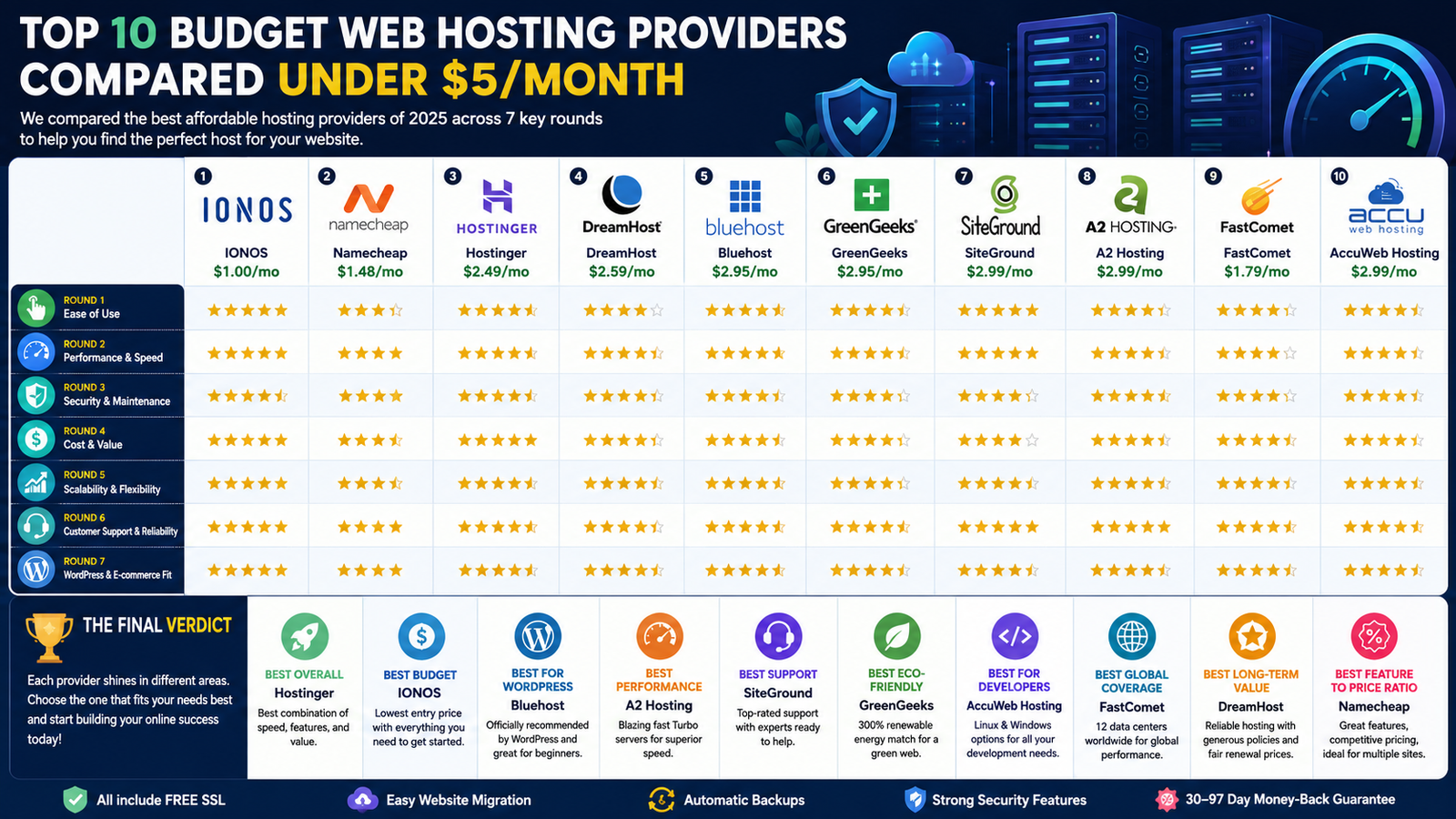
The 10 Best Budget Web Hosting Providers Under $5 per MonthLaunching a website no longer requires a large budget. In 2025, affordable web hosting has evolved dramatically, offering features that were once reserved for premium plans. For less than $5 per month, you can find hosting providers that include lightning-fast NVMe storage, free SSL certificates, one-click WordPress installation, automatic backups, global CDN integration, and reliable security—all without sacrificing performance.Today's best low-cost hosting plans are designed for bloggers, affiliate marketers, freelancers, small businesses, and anyone building their first online project. Many providers also offer substantial introductory discounts, making it possible to get started for as little as $1–2 per month while still benefiting from excellent uptime, responsive customer support, and modern infrastructure capable of handling growing traffic.At WebsiteHostingComparison.com, we compare dozens of hosting companies to identify the services that offer the strongest combination of price, speed, reliability, and overall value. Our rankings are based on real-world testing, feature comparisons, customer feedback, and current pricing. Each recommendation includes an overview of its strengths, potential drawbacks, technical specifications, and promotional pricing so you can make an informed decision before committing.Whether you're creating a personal blog, launching a niche affiliate website, building a portfolio, or opening an online store, this guide will help you find a hosting provider that matches both your budget and your long-term goals. If you're interested in learning more about hosting performance, be sure to read our in-depth comparison of SSD and NVMe hosting to understand how storage technology can significantly improve your website's speed and user experience.1. IONOS: Affordable Web Hosting Starting at Just $1/MonthIONOS has built a strong reputation as one of the most affordable and dependable hosting providers on the market. Backed by decades of experience and a global infrastructure spanning multiple data centers, it offers an excellent starting point for individuals, bloggers, freelancers, and small businesses looking to launch a website without a significant upfront investment.Even its entry-level shared hosting plans include many of the essentials needed to build a modern website. Users benefit from SSD storage for faster loading times, unlimited bandwidth on eligible plans, an intuitive control panel, automatic security updates, and simple one-click WordPress installation. These features make getting a website online straightforward, even for users with little technical experience.Key FeaturesFree domain name for the first year (on eligible plans)Fast SSD storageUnlimited email accounts and databasesDaily backupsFree SSL certificateDDoS protection and malware scanningOne-click WordPress installationUser-friendly hosting dashboardReliable uptime backed by enterprise-grade infrastructurePricingThe Basic plan starts at $1/month during the promotional period and includes hosting for one website with 10 GB of SSD storage. Higher-tier plans begin around $3/month and add support for multiple websites, increased storage, and additional features. As with most hosting companies, regular renewal pricing is higher after the introductory term. A 30-day money-back guarantee allows new customers to try the service with minimal risk.ProsExtremely competitive introductory pricingExcellent uptime and reliable infrastructureStrong security features includedBeginner-friendly management interfaceGood performance for personal and small business websitesConsRenewal prices are noticeably higherEntry-level plans include fewer performance optimizations than premium tiersBest ForIONOS is an excellent choice for first-time website owners, bloggers, freelancers, portfolio websites, and anyone looking for reliable hosting at the lowest possible starting price. It offers one of the best price-to-feature ratios among budget hosting providers in 2025.2. Namecheap: Outstanding Features at an Affordable PriceKnown for its budget-friendly domain names, Namecheap has also become one of the strongest competitors in the shared hosting market. Its hosting plans offer an impressive balance of affordability, performance, and useful features, making them a popular choice for bloggers, affiliate marketers, developers, and small businesses.Powered by cPanel and fast SSD storage, Namecheap's shared hosting plans are designed to support popular applications like WordPress, Joomla, and other PHP-based content management systems. With data centers in multiple regions, users can choose a location that delivers better performance for their target audience.Key FeaturesFree domain name for the first year (on eligible plans)Fast SSD storageUnmetered bandwidthFree CDN to improve website loading speedsAI-powered website builderFree SSL certificateBuilt-in malware and DDoS protectionOne-click installation for WordPress and other CMS platformsUnlimited MySQL databases on higher-tier plansRegular automatic backups24/7 live chat customer supportPricingThe Stellar plan starts at $1.98/month during the introductory period and includes hosting for up to three websites with 20 GB of SSD storage. The Stellar Plus plan starts around $2.98/month and adds unlimited websites along with unmetered SSD storage. Standard renewal pricing applies after the promotional term, and every plan includes a 30-day money-back guarantee.ProsExcellent value for the priceSupports multiple websites even on the entry-level planEasy-to-use cPanel interfaceStrong security features includedGreat option if you're also purchasing a domain nameConsFile (inode) limits may affect very large websitesCustomer support is available via live chat, but there is no phone supportBest ForNamecheap is an excellent choice for users who want to register a domain name and host their website with the same provider. It's particularly well suited for affiliate websites, niche sites, blogs, portfolios, and small business websites that need reliable performance without exceeding a modest budget.3. Hostinger: Fast, Modern Hosting with Built-In AI ToolsHostinger has become one of the most recognized names in affordable web hosting by combining competitive pricing with impressive performance. Designed for speed and ease of use, it offers an intuitive control panel, AI-powered tools, and optimized infrastructure that makes it an excellent choice for beginners and experienced website owners alike.Its hosting platform is built around high-performance NVMe storage and LiteSpeed web servers, helping websites load quickly even on entry-level plans. Combined with a global network of data centers and integrated caching, Hostinger delivers reliable performance for blogs, affiliate websites, business sites, and growing online projects.Key FeaturesHigh-speed NVMe SSD storageLiteSpeed web servers with built-in cachingFree SSL certificateAI-powered website builder and content toolsOne-click WordPress installationFree website migrationAutomatic daily or weekly backups (depending on the plan)Integrated CDN supportAdvanced security with firewall and malware protectionUser-friendly hPanel control panelUnlimited websites and bandwidth on eligible plansPricingHostinger's Premium plan starts at $2.49/month during the promotional period and includes 100 GB of NVMe storage, support for multiple websites, free email accounts, and a free domain name on qualifying subscriptions. Higher-tier plans, such as Business Hosting, begin around $3.99/month and include additional performance resources, enhanced backups, and more advanced features. Standard renewal pricing applies after the introductory period, and all plans are backed by a 30-day money-back guarantee.ProsExcellent loading speeds thanks to NVMe storage and LiteSpeed serversAI tools simplify website creation and managementModern, easy-to-use hosting dashboardFree website migrationGreat value for growing websitesGlobal data centers improve performance worldwideConsRenewal pricing is significantly higher than the introductory offerEntry-level plans have fewer resources than higher-tier packagesBest ForHostinger is an outstanding choice for bloggers, affiliate marketers, freelancers, small businesses, and anyone who wants a fast hosting platform with modern AI-powered features. It delivers one of the best combinations of speed, ease of use, and affordability among budget hosting providers in 2025.4. DreamHost: Reliable Unlimited Hosting with a Sustainability FocusDreamHost has been a trusted name in the hosting industry for decades, earning a reputation for reliable service, transparent pricing, and a strong commitment to sustainability. It's an excellent option for bloggers, small businesses, developers, and WordPress users looking for dependable hosting backed by years of experience.Built on SSD-powered infrastructure, DreamHost delivers consistent performance while offering generous resources and simple website management. Its custom hosting dashboard is designed to make common tasks easy, and the company places a strong emphasis on privacy, security, and environmentally responsible operations.Key FeaturesFast SSD storageFree domain name with eligible plansFree SSL certificateUnlimited trafficAutomatic daily backupsBuilt-in website cachingWeb application firewall (WAF)One-click WordPress installationWordPress staging environment on supported plansUnlimited email accounts on higher-tier plansEnvironmentally conscious hosting infrastructurePricingDreamHost's Shared Starter plan begins at $2.59/month during the introductory period and includes 50 GB of SSD storage for one website. The Shared Unlimited plan starts around $4.95/month and adds unlimited websites along with unlimited email accounts. Renewal pricing varies depending on the subscription length, and DreamHost stands out by offering an industry-leading 97-day money-back guarantee.ProsLong-standing reputation for reliabilityGenerous bandwidth and resource limitsExcellent WordPress compatibilityStrong security and automatic backupsOne of the longest money-back guarantees availableCommitment to environmentally responsible hostingConsCustom control panel may take time to learn for users familiar with cPanelCustomer support response times can occasionally be slower during busy periodsBest ForDreamHost is a great choice for bloggers, content creators, WordPress users, and small businesses that want dependable hosting with generous resources and a company that prioritizes long-term reliability and sustainability. Its combination of performance, customer-friendly policies, and environmental commitment makes it one of the strongest budget hosting providers available.5. Bluehost: A Beginner-Friendly Hosting Solution for WordPressBluehost has long been one of the most recognizable names in web hosting, especially among WordPress users. Designed to simplify the process of building and managing websites, it combines an easy-to-use interface with reliable performance, making it a popular choice for bloggers, entrepreneurs, and small businesses.Its hosting platform is optimized for WordPress from the start, allowing users to launch a website quickly without extensive technical knowledge. Built on modern server infrastructure with NVMe storage and integrated performance enhancements, Bluehost delivers fast page loading times while providing a complete ecosystem for growing your online presence.Key FeaturesHigh-speed NVMe SSD storageFree domain name for the first yearFree SSL certificateOne-click WordPress installationAI-assisted website creation toolsBuilt-in website staging on supported plansFree CDN for faster global performanceWeb application firewall (WAF)Malware protectionWooCommerce integration for online storesSSH access and developer-friendly features on eligible plansPricingBluehost's Basic plan starts at $2.95/month during the promotional period and includes 10 GB of NVMe storage for one website. The Plus plan begins around $5.45/month and supports multiple websites with additional storage and features. Renewal rates are higher after the introductory term, and all shared hosting plans include a 30-day money-back guarantee.ProsExcellent choice for WordPress beginnersSimple and intuitive dashboardStrong WordPress and WooCommerce integrationFree domain and SSL certificateGood website performanceLarge library of tutorials and documentationConsRenewal pricing is significantly higher than introductory ratesAdditional services and add-ons are promoted during the signup processBest ForBluehost is an excellent option for anyone launching their first WordPress website, personal blog, portfolio, or small business site. Its beginner-friendly experience, WordPress optimization, and integrated website management tools make it one of the most accessible hosting providers for users who want to get online quickly without dealing with complicated server administration.6. GreenGeeks: Eco-Friendly Hosting Without Compromising PerformanceGreenGeeks stands out by combining reliable web hosting with a strong commitment to environmental sustainability. The company invests heavily in renewable energy initiatives, making it an attractive option for individuals and businesses that want to reduce the environmental impact of their online presence while still benefiting from fast, secure hosting.Built on modern infrastructure featuring SSD storage and LiteSpeed web servers, GreenGeeks delivers excellent website performance for blogs, business websites, e-commerce stores, and WordPress projects. Its hosting platform also includes a comprehensive set of security and optimization tools to help websites remain fast and protected.Key FeaturesFast SSD storageLiteSpeed web servers with built-in cachingFree domain name for the first yearFree SSL certificateFree CDN for improved global performanceAutomatic nightly backupsMalware scanning and proactive security monitoringOne-click WordPress installationWordPress staging environment on supported plansUnlimited bandwidth on eligible plansEnvironmentally responsible hosting powered by renewable energy initiativesPricingThe Lite plan starts at $2.95/month during the promotional period and includes 25 GB of SSD storage for one website. The Pro plan starts around $4.95/month, offering support for multiple websites, additional performance resources, and enhanced features. Renewal pricing is higher after the initial subscription, and every shared hosting plan is backed by a 30-day money-back guarantee.ProsEnvironmentally friendly hosting providerExcellent website performance with LiteSpeed serversStrong security features includedFree CDN and daily backupsReliable customer supportGood WordPress optimizationConsRenewal prices are considerably higher than promotional ratesFewer global data center locations than some larger competitorsBest ForGreenGeeks is an excellent choice for bloggers, freelancers, small businesses, and environmentally conscious website owners who want reliable hosting while supporting sustainable business practices. It offers a compelling combination of performance, security, and eco-friendly initiatives, making it one of the best green hosting providers available in 2025.7. SiteGround: Premium Performance at a Budget-Friendly Starting PriceSiteGround has earned a reputation for delivering exceptional performance, outstanding customer support, and a hosting platform optimized for WordPress. Although its renewal prices are higher than many competitors, its introductory plans offer excellent value for users who prioritize speed, reliability, and managed hosting features.Powered by Google Cloud infrastructure, SiteGround combines SSD storage, advanced caching technologies, and a global network to provide fast page loading times and a stable hosting environment. It's particularly popular among bloggers, agencies, developers, and businesses that expect their websites to grow over time.Key FeaturesHigh-performance SSD storageGoogle Cloud infrastructureAdvanced caching for faster page loadsFree SSL certificateFree CDN integrationAutomatic daily backupsAI-powered bot protectionAdvanced firewall and malware protectionOne-click WordPress installationWordPress staging tools on higher-tier plansGit integration and developer-friendly featuresUnlimited email accountsPricingThe StartUp plan begins at $2.99/month during the introductory period and includes 10 GB of SSD storage for one website. The GrowBig plan starts around $4.99/month and adds support for multiple websites, additional server resources, and advanced features such as staging environments. Renewal pricing is significantly higher after the promotional period, but SiteGround includes free website migration assistance and a generous collection of managed hosting tools.ProsOutstanding website performanceReliable uptime and modern infrastructureExcellent customer supportStrong security and automatic backup featuresAdvanced tools for WordPress users and developersBuilt on Google Cloud for improved reliabilityConsRenewal prices are among the highest in the shared hosting marketA free domain name is not included with shared hosting plansBest ForSiteGround is an excellent choice for WordPress websites, growing blogs, business websites, and online stores that need consistently fast performance and dependable support. Users willing to pay higher renewal rates in exchange for premium hosting quality will find SiteGround to be one of the strongest options available in 2025.8. A2 Hosting: High-Speed Hosting for Performance-Focused WebsitesA2 Hosting has built its reputation around speed. Known for its performance-optimized infrastructure, it offers hosting plans designed to deliver fast page loading times for websites of all sizes. Whether you're running a WordPress blog, an e-commerce store, or a custom web application, A2 Hosting provides a solid balance of speed, flexibility, and developer-friendly features.Its platform combines high-speed NVMe storage, LiteSpeed web servers on selected plans, and advanced caching technologies to help websites perform at their best. The company also offers a wide range of tools for developers while remaining accessible to beginners through simple one-click installations and an intuitive hosting interface.Key FeaturesHigh-performance NVMe SSD storageLiteSpeed web servers on eligible plansUnlimited bandwidth on supported plansFree SSL certificateFree website migrationAutomatic backupsAdvanced security with HackScan protectionOne-click WordPress installationWP-CLI support for WordPress developersDeveloper tools including SSH access, Git, and multiple PHP versionsOptimized hosting for e-commerce websitesPricingThe Startup plan starts at $2.99/month during the promotional period and includes 100 GB of NVMe storage for one website. Higher-performance plans, including the Turbo lineup, start around $6.99/month and provide additional speed optimizations, more server resources, and enhanced caching technologies. Renewal pricing is higher after the initial term, and A2 Hosting offers an anytime money-back guarantee, giving customers greater flexibility than many competing providers.ProsExcellent website performanceFast NVMe storage and advanced cachingWide range of developer-friendly toolsFree website migrationFlexible hosting options for different project sizesUnique anytime money-back guaranteeConsPremium performance features are reserved for higher-tier plansCustomer support quality can vary depending on demandBest ForA2 Hosting is an excellent choice for developers, WordPress users, online stores, and website owners who prioritize speed above everything else. Its high-performance infrastructure and flexible development tools make it particularly well suited for growing websites that need fast loading times and reliable hosting without moving to a VPS or dedicated server.9. FastComet: Reliable Global Hosting at an Affordable PriceFastComet has become a popular choice for website owners looking for dependable performance, responsive customer support, and an extensive global network of data centers. Although it is smaller than some of the industry's biggest brands, it has earned a strong reputation for offering premium features at competitive introductory prices.Built on modern SSD and NVMe-powered infrastructure, FastComet delivers fast loading speeds while providing an easy-to-use cPanel interface. Its worldwide server locations allow users to host their websites closer to their visitors, improving performance and user experience for international audiences.Key FeaturesHigh-speed SSD and NVMe storageFree domain name transferFree SSL certificateFree CDN integrationcPanel hosting control panelAutomatic daily backupsAdvanced malware scanning and security protectionOne-click installation for over 400 popular applicationsWordPress and WooCommerce optimizationFree website migration24/7 customer support with fast response timesPricingThe FastCloud plan starts at $1.79/month during the introductory period and includes 15 GB of SSD storage for one website. The FastCloud Extra plan starts around $2.49/month and provides additional server resources, improved performance, and more advanced optimization features. Standard renewal pricing applies after the promotional period, and all plans include a 45-day money-back guarantee.ProsExcellent worldwide server coverageStrong website performanceResponsive and knowledgeable customer supportFree website migration includedDaily backups and robust security featuresUser-friendly cPanel interfaceConsEntry-level plans include limited storageRenewal pricing is noticeably higher than introductory ratesBest ForFastComet is an excellent choice for bloggers, freelancers, affiliate marketers, and small businesses that serve an international audience. Its combination of global data centers, reliable performance, responsive support, and competitive pricing makes it one of the best-value shared hosting providers for users who want fast websites around the world.10. AccuWeb Hosting: A Flexible Choice for Linux and Windows WebsitesAccuWeb Hosting is a versatile provider that stands out by supporting both Linux and Windows hosting environments. This flexibility makes it an excellent option for developers, businesses, and website owners who need to run a wide range of technologies, from WordPress and PHP applications to ASP.NET and Microsoft SQL Server projects.Despite its affordable pricing, AccuWeb Hosting includes many of the features expected from premium hosting providers. Fast SSD storage, reliable infrastructure, and strong security tools make it suitable for personal websites, business sites, e-commerce stores, and custom web applications.Key FeaturesFast SSD storageChoice of Linux or Windows hostingFree SSL certificateFree website migrationUnlimited bandwidth on eligible plansDaily automatic backupscPanel and Plesk control panel optionsOne-click WordPress installationWooCommerce optimizationSupport for PHP, ASP.NET, and Microsoft technologiesReliable hosting infrastructure with high uptimePricingThe Startup plan starts at $2.99/month during the promotional period and includes 10 GB of SSD storage for one website. The Pro plan begins around $4.99/month, offering additional storage, improved performance, and more hosting resources. Standard renewal pricing applies after the introductory period, and all shared hosting plans include a 30-day money-back guarantee.ProsSupports both Linux and Windows hosting environmentsExcellent choice for ASP.NET and Microsoft-based applicationsFree website migrationStrong security and backup featuresUser-friendly control panel optionsGood value for developers managing different technology stacksConsFewer global data center locations than some larger competitorsEntry-level plans offer limited storage compared to some alternativesBest ForAccuWeb Hosting is an ideal choice for developers, agencies, and businesses that need the flexibility to host either Linux or Windows-based applications. It's particularly well suited for users working with ASP.NET, Microsoft SQL Server, or hybrid technology stacks while still offering an excellent experience for WordPress, WooCommerce, and traditional PHP websites.Comparing the Best Budget Web Hosting ProvidersChoosing the right hosting provider isn't just about finding the lowest monthly price. Performance, ease of use, security, scalability, and customer support all play an important role in your website's long-term success. Here's how our top budget hosting providers compare across the categories that matter most.Ease of Use: Best for BeginnersIf you're building your first website, you'll want a hosting provider that makes setup as simple as possible.Hostinger stands out thanks to its modern hPanel interface and built-in AI tools that can help you create and manage a website with very little technical knowledge. Everything from installing WordPress to managing email accounts is straightforward.Namecheap also provides an excellent beginner experience with its familiar cPanel interface, making it easy for users who have managed hosting before.IONOS deserves recognition for its clean custom dashboard, which simplifies website management and guides new users through the setup process.Winner: Hostinger offers the easiest overall experience, while IONOS is an excellent alternative for complete beginners.Performance and SpeedWebsite speed affects both user experience and search engine rankings, making performance one of the most important factors when choosing a hosting provider.A2 Hosting is known for its speed-focused infrastructure, offering NVMe storage, advanced caching, and high-performance server options designed to reduce page loading times.SiteGround consistently delivers excellent performance through Google Cloud infrastructure, advanced caching, and intelligent optimization tools.Hostinger also performs exceptionally well for its price, combining LiteSpeed servers with NVMe storage to provide impressive loading speeds on affordable plans.Winner: A2 Hosting for maximum performance, with SiteGround close behind for users seeking premium managed hosting.Security FeaturesEvery hosting provider on this list includes essential security tools, but some go further by offering more advanced protection.SiteGround provides one of the strongest security packages, including automatic updates, proactive server monitoring, intelligent firewall protection, and daily backups.GreenGeeks and DreamHost also include reliable backup systems and robust security features, making them excellent choices for users who value peace of mind.IONOS offers a solid security foundation with malware scanning, DDoS protection, and free SSL certificates included in its shared hosting plans.Winner: SiteGround offers the most comprehensive security solution.Best Value for MoneyAffordable pricing is important, but long-term value depends on the features included in your hosting plan.IONOS remains one of the least expensive ways to launch a website, making it ideal for users with very limited budgets.Namecheap offers an excellent feature set at a competitive price, especially for users managing multiple websites.Hostinger provides one of the strongest overall value propositions thanks to its combination of speed, AI tools, modern infrastructure, and generous hosting resources.DreamHost is also worth considering for users planning to keep their hosting for several years, as its renewal pricing is generally more competitive than many rivals.Winner: Hostinger delivers the best overall value, while IONOS is the top choice for the lowest entry price.Scalability and GrowthAs your website grows, you'll want a hosting provider that can easily accommodate increasing traffic and additional projects.Bluehost offers a clear upgrade path from shared hosting to VPS and dedicated servers, making it suitable for growing WordPress websites and online businesses.A2 Hosting provides flexible upgrade options and high-performance plans for websites that need additional speed and server resources.AccuWeb Hosting is particularly appealing to developers who may need to transition between Linux and Windows hosting environments as their projects evolve.Winner: Bluehost is an excellent choice for long-term WordPress growth.Customer SupportResponsive technical support can save valuable time when issues arise.SiteGround has earned an excellent reputation for knowledgeable support staff and fast response times across live chat and ticket channels.FastComet is also highly regarded for its responsive customer service and willingness to assist users with website migrations and technical questions.Hostinger provides multilingual support around the clock, making it a strong option for international customers.Winner: SiteGround consistently delivers the highest-quality support experience.Best for WordPress and Online StoresMost hosting providers support WordPress, but some offer additional features specifically designed for WordPress websites and WooCommerce stores.Bluehost provides one of the most complete WordPress experiences, with one-click installation, AI-assisted setup tools, WooCommerce integration, and a beginner-friendly dashboard.Hostinger combines excellent WordPress performance with AI-powered website creation tools that simplify launching new websites.GreenGeeks offers solid WooCommerce compatibility alongside fast LiteSpeed servers and environmentally friendly hosting.Winner: Bluehost is our top recommendation for WordPress users, while Hostinger is an excellent alternative for users who want modern AI-powered tools.Final VerdictThe good news is that you no longer need to spend a fortune to get reliable web hosting. Every provider in this guide offers excellent value for less than $5 per month, but each excels in different areas.Best Overall: Hostinger — The best combination of speed, modern features, AI tools, and value.Best Budget Choice: IONOS — Perfect for launching your first website at the lowest possible cost.Best for WordPress: Bluehost — Ideal for bloggers, businesses, and WooCommerce stores.Best Performance: A2 Hosting — Designed for users who prioritize website speed.Best Customer Support: SiteGround — Outstanding technical assistance and reliable infrastructure.Best Eco-Friendly Host: GreenGeeks — Great performance with a commitment to sustainability.Best for Developers: AccuWeb Hosting — Flexible Linux and Windows hosting options.Best Global Coverage: FastComet — Excellent international performance thanks to multiple worldwide data centers.Best Feature-to-Price Ratio: Namecheap — A strong all-around option for users managing multiple websites.Best Long-Term Value: DreamHost — Reliable hosting backed by generous policies and competitive long-term pricing.Ultimately, the best hosting provider depends on your specific needs. If you're launching your very first website, IONOS or Hostinger are hard to beat. If you're building a growing WordPress business, Bluehost and SiteGround are excellent investments. For developers and performance enthusiasts, A2 Hosting offers impressive speed, while GreenGeeks is the obvious choice for environmentally conscious website owners.No matter which provider you choose, today's affordable shared hosting plans include features that were once only available on premium services. With fast SSD or NVMe storage, free SSL certificates, automatic backups, and easy WordPress installation now becoming standard, it's easier than ever to build a fast, secure, and professional website without exceeding your budget.

Read article
Custom CMS vs WordPress: A Developer's Perspective
post
1 min read

Custom CMS vs WordPress: A Developer's Perspective

Understanding CMS Platforms and Why Your Choice MattersA content management system (CMS) is the software that allows you to create, organize, and publish content on your website without having to edit code for every change. While WordPress is the most widely recognized CMS, it represents only one of many available solutions. If you're comparing a custom CMS vs WordPress, understanding the strengths and limitations of each approach is essential before making a long-term investment. Whether you're launching a new website or upgrading an existing one, the platform you select will influence everything from performance and scalability to content management, search engine visibility, and long-term operating costs.Selecting the wrong CMS can create significant challenges down the road. Companies sometimes adopt WordPress for projects that require a higher degree of customization, only to encounter limitations as their requirements grow. On the other hand, some organizations invest in a fully custom-built solution when an established CMS would have met their needs perfectly, resulting in unnecessary development and maintenance expenses.The right choice depends on your goals, budget, technical requirements, and future plans. Taking the time to evaluate your options carefully can save both time and money while providing a stronger foundation for long-term growth.Where WordPress ExcelsWordPress remains one of the most popular website platforms in the world, and for good reason. Its widespread adoption has created a massive ecosystem of developers, themes, plugins, and educational resources. This makes it an attractive option for businesses looking to launch a professional website without investing in a fully custom solution. In any custom CMS vs WordPress comparison, this mature ecosystem is one of WordPress's strongest advantages.For websites with common requirements—such as informational pages, blogs, contact forms, portfolios, or basic online stores—WordPress offers a practical balance between functionality, ease of use, and cost. It allows business owners and content teams to manage and update their websites without requiring advanced technical knowledge.One of WordPress's biggest advantages is its extensive plugin ecosystem. Features that would otherwise require custom development can often be added with just a few clicks. Search engine optimization tools, appointment booking systems, payment processing, customer relationship management integrations, email marketing platforms, membership areas, and analytics solutions are all readily available through existing plugins.For small and medium-sized businesses, this flexibility can dramatically reduce development time and costs. Instead of building every feature from scratch, companies can leverage proven solutions that are already tested, documented, and widely supported by the WordPress community.The Challenges of Using WordPressWhile WordPress is an excellent solution for many websites, it is not the ideal choice for every project. As business requirements become more complex, the platform's limitations can become increasingly apparent. Features that initially seem easy to implement may require multiple plugins, custom modifications, and ongoing maintenance, adding complexity over time. This is where the custom CMS vs WordPress debate becomes especially relevant, as projects with unique requirements often outgrow the flexibility of a plugin-based approach.Performance is often one of the first areas affected. As a website grows in traffic, content volume, and functionality, WordPress can become more demanding on server resources. Websites that rely on numerous plugins and custom integrations may experience slower load times and require extensive optimization efforts to maintain acceptable performance. In some cases, developers spend more time working around platform constraints than building new features.Security is another factor that deserves careful consideration. Due to its popularity, WordPress is one of the most frequently targeted website platforms on the internet. Maintaining a secure installation requires regular updates, ongoing vulnerability monitoring, and careful evaluation of third-party plugins and themes. While these tasks are manageable, they represent an ongoing responsibility that should not be overlooked.For organizations with highly specific requirements, advanced workflows, or long-term scalability goals, these challenges can make WordPress less attractive than a more tailored solution designed around the project's unique needs.When a Custom CMS Is the Better ChoiceA custom CMS becomes a strong option when a project's requirements go beyond the capabilities of off-the-shelf platforms. While many websites can be successfully built with WordPress, some businesses need greater flexibility, deeper customization, and more control over how content is managed and delivered. In the custom CMS vs WordPress discussion, this is the point where a tailored solution often begins to deliver greater long-term value.This is particularly true for platforms that rely on complex content models, advanced user permissions, specialized business processes, or extensive integrations with third-party systems such as CRM, ERP, or internal enterprise applications. In these situations, a custom-built CMS can provide a cleaner, more efficient solution that is designed specifically around the organization's workflows rather than forcing those workflows to adapt to the limitations of a general-purpose platform.A related discussion is the comparison between headless CMS solutions and traditional WordPress implementations. In a headless architecture, the content management layer is separated from the user-facing frontend. This allows developers to build modern web applications using the technologies that best fit the project while maintaining a dedicated system for content management behind the scenes.The benefits of this approach often include improved performance, greater scalability, enhanced flexibility, and a more maintainable codebase. Teams can create highly customized user experiences without being constrained by the presentation layer of a traditional CMS.The primary drawback is that custom and headless solutions typically require a larger initial investment. Development takes longer, and businesses cannot rely on the extensive library of plugins and themes available in ecosystems such as WordPress. However, for projects with demanding technical requirements or ambitious long-term goals, the additional investment can deliver significant advantages in flexibility, efficiency, and future growth.Comparing Speed and PerformanceWebsite performance plays a critical role in both user satisfaction and search engine visibility. Faster websites provide a better browsing experience, improve engagement, and can contribute positively to search rankings. For this reason, performance should be a key consideration when evaluating a CMS platform. When comparing a custom CMS vs WordPress, performance is often one of the most important factors businesses evaluate.In many cases, custom-built and headless CMS solutions have a natural advantage when it comes to speed. Because they are designed around specific project requirements, they avoid much of the additional code, dependencies, and plugin overhead commonly found in traditional CMS platforms. This often results in leaner applications, faster page loads, and more efficient use of server resources.WordPress is fully capable of delivering strong performance, but achieving and maintaining that performance typically requires careful planning. Factors such as theme quality, plugin selection, caching strategies, database optimization, and hosting infrastructure all play an important role. Without proper management, performance can gradually decline as additional functionality is added over time.For websites that handle large amounts of traffic, rely on complex real-time functionality, or serve highly dynamic content, a custom solution can offer meaningful performance benefits and greater scalability. However, for most small to medium-sized business websites, a professionally developed and well-optimized WordPress installation will generally provide more than enough speed to meet user expectations and business objectives.Long-Term Maintenance ConsiderationsThe differences between WordPress and a custom CMS often become more noticeable over time, particularly when it comes to maintenance and operational costs. While the initial development budget is important, the long-term effort required to keep a website running smoothly can have an even greater impact on the total cost of ownership. In a custom CMS vs WordPress comparison, long-term maintenance is often one of the deciding factors for growing businesses.With WordPress, maintenance is an ongoing responsibility. The platform itself, along with its themes and plugins, receives regular updates that must be applied to ensure compatibility, performance, and security. Routine tasks such as monitoring vulnerabilities, managing backups, testing updates, and resolving conflicts between plugins are all part of maintaining a healthy WordPress installation.When these tasks are ignored, problems can accumulate quickly. Outdated components may cause functionality issues, create security risks, or introduce compatibility problems that affect the user experience. As a result, WordPress websites require consistent attention to remain stable and secure.A custom CMS often follows a different maintenance model. Because the platform is built specifically for the project's requirements, it typically relies on fewer third-party dependencies and has a more controlled architecture. Updates are planned according to business needs rather than being driven by a constant stream of external plugin releases. This can reduce the frequency of maintenance activities and simplify long-term system management.However, this approach comes with its own trade-off. New features, modifications, and enhancements generally require development work rather than the installation of an existing plugin or extension. For organizations that already work with a trusted development team, this is rarely a concern. For businesses that prefer to manage every aspect of their website independently, it is an important factor to weigh when choosing between a custom solution and a more flexible platform like WordPress.SEO Considerations for WordPress and Custom CMS PlatformsSearch engine optimization is often a major factor when selecting a CMS, but it is important to understand that Google does not rank websites based on the platform they use. A well-built WordPress website can perform exceptionally well in search results, just as a custom CMS can. Ultimately, SEO success depends on the quality of the implementation, content strategy, technical optimization, and ongoing maintenance. When evaluating a custom CMS vs WordPress, the real SEO advantage comes from how well the platform is built and maintained rather than the CMS itself.That said, the choice of CMS can influence how easily certain SEO best practices are implemented and maintained over time.WordPress SEO AdvantagesWordPress is widely recognized for its strong SEO ecosystem. Businesses and content teams can access powerful optimization tools without requiring extensive technical knowledge.Key benefits include:Access to mature SEO plugins such as Yoast SEO and Rank MathEasy management of page titles, meta descriptions, and social sharing metadataAutomated XML sitemap generationBuilt-in support for structured content and SEO workflowsLarge community support and extensive documentationThese tools make it possible for non-technical users to handle many day-to-day SEO tasks without developer involvement.SEO Benefits of a Custom CMSA custom CMS takes a different approach. Rather than relying on third-party plugins, SEO functionality is built directly into the platform according to the project's specific requirements.Potential advantages include:Fully customized SEO architecture tailored to business goalsGreater control over URL structures, metadata, schema markup, and indexing rulesCleaner codebases with fewer unnecessary scripts and dependenciesBetter integration between content management and technical SEO requirementsMore predictable performance across the entire platformWhile these features require additional development effort upfront, they can provide a highly optimized foundation for long-term growth.Performance and Technical SEOWebsite speed remains an important ranking factor, and this is an area where custom solutions often have an advantage.Common performance-related benefits of custom builds include:Reduced code overheadFewer third-party dependenciesFaster page renderingImproved scalability under heavy trafficGreater flexibility for advanced caching and optimization strategiesWordPress can also achieve excellent performance, but it typically requires more careful optimization and ongoing monitoring.Potential SEO ChallengesRegardless of the platform chosen, poor implementation can negatively affect search visibility.With WordPress, common issues include:Duplicate content generated by plugins or taxonomiesExcessive JavaScript and CSS loadingPlugin conflicts that impact crawlabilityRedirect chains created by multiple SEO toolsPerformance degradation caused by unnecessary extensionsWith a custom CMS, challenges may include:Missing SEO functionality if it is not planned during developmentAdditional development costs for advanced SEO featuresGreater reliance on developers to implement technical improvementsIn the end, both WordPress and custom CMS platforms can achieve excellent search rankings. The most important factor is not the platform itself, but how effectively it is designed, optimized, and maintained over the life of the website.Evaluating Costs Over the Long TermOne of the most common misconceptions when comparing CMS platforms is focusing solely on the initial development budget. While upfront costs are important, they represent only part of the overall investment. A more meaningful comparison considers the total cost of ownership over several years. In the custom CMS vs WordPress debate, long-term costs are often more important than the initial price of development.WordPress is often the more affordable option at the beginning of a project. Development can be completed quickly, and many features are available through existing themes and plugins. However, ongoing expenses such as plugin subscriptions, security management, hosting upgrades, maintenance services, and performance optimization can gradually increase the overall cost.A custom CMS generally requires a larger initial investment because the platform is designed and developed specifically for the project's needs. In return, businesses often benefit from a more controlled environment with fewer third-party dependencies, reduced complexity, and lower long-term maintenance requirements. This can help minimize unexpected costs and provide greater predictability as the platform evolves.Rather than asking which solution is less expensive to launch, businesses should consider which option offers the best value over the lifespan of the website. The true measure is not the initial price tag, but the total cost of maintaining, improving, and scaling the platform over time.A Practical Framework for Choosing the Right CMSThe best CMS is not necessarily the most popular or the most advanced—it is the one that aligns with your business goals, technical requirements, and growth plans. Ultimately, the custom CMS vs WordPress decision should be based on your current needs and where you expect your business to be in the years ahead.As a general guideline, WordPress is often the right choice when:You need a professional website with standard functionalityBudget is a primary considerationSpeed of deployment is importantContent will be managed by non-technical usersThe project relies on common features that can be supported by existing pluginsA custom or headless CMS may be a better fit when:Your content model is highly structured or complexWebsite performance is a critical business requirementAdvanced integrations with third-party systems are necessaryYou need complete control over workflows and functionalitySignificant traffic growth or platform expansion is expectedA fully custom CMS is often the preferred option when:You are building a digital product rather than a traditional websiteThe platform includes unique business logic or specialized user experiencesOff-the-shelf solutions would require extensive customizationLong-term flexibility and scalability are strategic prioritiesIf the best option is not immediately obvious, seeking advice from an experienced developer or CMS consultant can be valuable. A good technology partner will evaluate your objectives, technical constraints, and future plans before recommending a solution, ensuring that the platform serves the business rather than forcing the business to adapt to the platform.Resource:Why I built my own cms instead of using wordpress

Read article
As a Beginner Developer (Junior), My First Project Would Be a News Tracking RSS Feed
post
1 min read

As a Beginner Developer (Junior), My First Project Would Be a News Tracking RSS Feed

Starting a career in software development can feel overwhelming. There are countless technologies to learn, frameworks to explore, and project ideas competing for your attention. Many junior developers jump straight into building social networks, e-commerce platforms, or complex SaaS products, only to become frustrated when the project becomes too large to manage.If I were starting over today as a junior developer, my very first serious project would be a News Tracking RSS Feed application.Not because it's flashy.Not because it's trendy.But because it teaches nearly every fundamental skill a developer needs without becoming overwhelmingly complex.Why an RSS Feed Tracker?A news tracking platform sits in a sweet spot between simplicity and real-world usefulness.One of the biggest mistakes beginner developers make is choosing projects that are either too simple to teach meaningful skills or so ambitious that they never get finished. A news tracking RSS feed application sits perfectly between those two extremes.At its core, the project only needs to:Fetch RSS feedsParse contentStore articlesDisplay information to users (you, as it's for yourself)Yet behind those simple requirements lies a surprising number of valuable engineering concepts.There is another reason why I believe this project is particularly valuable:Staying informed (and focused) has become a competitive advantage.Whether you're a developer, entrepreneur, marketer, investor, freelancer, or business owner, the ability to quickly discover and process new information can significantly impact your decisions. Technologies evolve, industries change, competitors launch products, algorithms get updated, and new opportunities appear every day.The people who consistently stay informed are often the ones who identify trends before everyone else.As developers, this is especially important. New frameworks emerge, security vulnerabilities are discovered, programming languages evolve, cloud providers release new services, and AI tools continuously reshape the way software is built. Keeping up with these changes can directly influence your career growth and the quality of the solutions you deliver.A news tracking platform helps solve this problem by centralizing information from multiple sources into a single place. Instead of manually visiting dozens of websites every day, you can aggregate content automatically and focus only on what matters.However, behind each of these seemingly simple requirements lies an entire set of skills that developers use every day.When fetching RSS feeds, you'll learn how applications communicate with external systems. You'll discover how to make HTTP requests, handle network failures, manage response formats, and deal with services that don't always behave as expected. Suddenly, you're working with real-world data rather than static JSON files or hardcoded examples.Parsing feed content introduces another layer of complexity. RSS feeds are typically delivered as XML, which means you'll learn how structured data formats work and how to transform external information into data your application can understand. You'll also encounter edge cases such as missing fields, malformed feeds, duplicate articles, and inconsistent metadata.Once the data is available, it must be stored somewhere. This naturally introduces database design concepts. You'll start thinking about how articles relate to publishers, categories, tags, authors, and users. Questions that initially seem trivial become opportunities to learn about data modeling, relationships, indexing, and performance optimization.Displaying the information to users may sound like the easiest part, but it introduces its own challenges. How should articles be organized? How should users search through thousands of entries? How do you paginate results efficiently? What information should be shown in previews versus detail pages? These questions force you to think like a product developer rather than simply a programmer.As the application grows, you'll begin noticing opportunities for improvement. Users might want notifications when new articles appear. They may want custom categories, saved searches, or personalized feeds. Suddenly you're exploring authentication, background jobs, scheduling systems, caching strategies, and user preferences.This is where the RSS tracker becomes particularly valuable as a learning project.Unlike many tutorial applications that exist only for educational purposes, a news tracker solves a real problem. Businesses use similar systems to monitor competitors, marketers use them to discover content opportunities, investors use them to follow industries, and researchers use them to track information sources. In many ways, information has become a form of leverage. The faster you can access, organize, and understand it, the better positioned you are to make informed decisions.Even better, the project can evolve alongside your skills. A beginner can build a basic RSS reader in a few weeks, while a more experienced developer can transform the same foundation into a sophisticated content intelligence platform with AI-powered summarization, trend analysis, keyword extraction, sentiment detection, and automated reporting.Few projects offer such a smooth progression from beginner concepts to advanced engineering challenges.That's why an RSS feed tracker is such a powerful first project. It starts simple enough to be achievable, provides immediate personal value by helping you stay informed, and contains enough depth to teach lessons that remain relevant throughout an entire software development career.You May Discover Markets You Never Knew ExistedOne of the most underrated benefits of building a news tracking platform is that it can expose you to entirely new markets and industries you might never have explored otherwise.As you aggregate articles from different sources, you'll naturally come across emerging technologies, niche businesses, new investment opportunities, and growing industries that rarely receive mainstream attention. A single article can lead you down a rabbit hole of discovery, introducing you to markets you didn't even know existed.Many successful businesses are built by people who identify opportunities before they become obvious. By consistently monitoring diverse sources of information, you increase your chances of spotting new trends, underserved audiences, innovative business models, or fast-growing niches long before they become saturated.For entrepreneurs, this can inspire entirely new product ideas. For developers, it can reveal industries in need of better software. For marketers, it can uncover untapped content opportunities. And for investors, it can highlight sectors showing early signs of growth.In other words, your RSS tracker becomes more than a news reader—it becomes a discovery engine. The more high-quality information flows through your platform, the greater the chance that you'll stumble upon an opportunity capable of changing the direction of your next project, career, or business.It Can Replace Doom Scrolling With Intentional LearningMany of us have developed the habit of opening social media whenever we have a few spare minutes. We scroll endlessly through short videos, memes, viral posts, and endless debates, only to realize twenty or thirty minutes have disappeared without learning anything particularly useful.A news tracking platform offers a healthier alternative.Instead of consuming whatever an algorithm decides to show you, you choose the topics, industries, and sources that deserve your attention. Every time you open your application, you're intentionally learning about subjects that can improve your career, business, or personal interests.Over time, this small habit compounds. Fifteen minutes spent reading high-quality articles about software engineering, artificial intelligence, entrepreneurship, finance, cybersecurity, or your own industry can be far more valuable than an hour of mindless scrolling.That's not to say social media has no value—it can be an excellent place to discover ideas, connect with people, and follow industry leaders. The problem is that its business model is designed to maximize your attention, not necessarily your learning.By building and using your own RSS tracker, you take back control of your information diet. Instead of being pulled into an endless feed optimized for engagement, you create a personalized stream optimized for knowledge. In the long run, that simple shift can have a surprisingly large impact on your productivity, the quality of your decisions, and the opportunities you discover.You Decide Who Deserves Your AttentionOne of the biggest differences between an RSS reader and most social media platforms is simple: you decide who to follow.On social media, algorithms are designed to maximize engagement. They continuously decide what appears in your feed based on what is most likely to keep you scrolling. While this can occasionally surface interesting content, it also means your attention is constantly being influenced by a system whose goals don't necessarily align with your own.An RSS tracker puts that decision back in your hands.You choose every publication, blog, newsletter, company, creator, and industry expert that appears in your feed. Nothing is injected because it's trending. Nothing goes viral simply because an algorithm decided it should. If a source no longer provides value, you remove it. If you discover someone consistently producing high-quality content, you add them.Over time, you build an information ecosystem that reflects your own goals instead of someone else's engagement metrics.This level of control is incredibly valuable. Whether you're trying to become a better developer, entrepreneur, marketer, investor, or simply stay informed about a particular industry, you can curate a stream of information tailored to your interests and filter out the noise. Instead of fighting an algorithm for your attention, you create an environment designed to help you learn, grow, and make better decisions every day.You'll Learn How to Consume External DataOne of the most common responsibilities in professional software development is integrating with third-party systems. Whether it's a payment gateway, a social network, an AI service, or a business API, developers constantly work with data they don't control.An RSS feed tracker introduces this concept early.To collect articles, you'll need to:Make HTTP requestsHandle timeouts and connection errorsProcess XML dataValidate responsesManage duplicate contentDeal with malformed or incomplete feedsThese may sound like small challenges, but they're exactly the kinds of problems developers face in production environments every day.Unlike tutorial projects that rely on static or fake data, an RSS tracker works with live information from real websites. Some feeds will be fast, others slow. Some will be perfectly formatted, while others will contain missing fields or invalid data.Learning to handle these situations teaches an important lesson: real-world software must expect things to go wrong.By building an RSS reader, you'll gain hands-on experience consuming external data, handling failures gracefully, and transforming information into something your application can use—skills that are valuable in virtually every modern software project.You'll Learn Web Scraping When RSS Isn't AvailableNot every website offers an RSS feed or a public API. If there's valuable information you want to monitor, you'll eventually encounter sites that provide no easy way to access their content.This is where you'll discover web scraping.You'll learn how to retrieve web pages, parse HTML, extract relevant information, and deal with real-world challenges such as changing page structures, pagination, duplicate detection, rate limiting, and anti-bot protections. You'll also learn the importance of respecting websites' terms of service and using scraping responsibly.Suddenly, your application is no longer limited to RSS feeds. It can collect information from blogs, documentation websites, product announcements, company newsrooms, job boards, public reports, and countless other sources that don't expose structured feeds.More importantly, you'll begin to understand an important engineering principle: there is often more than one way to integrate with external data. Sometimes you'll consume an API. Sometimes you'll parse an RSS feed. And sometimes you'll build a scraper to collect publicly available information when no structured interface exists.These are practical skills used every day by search engines, price comparison platforms, market intelligence tools, competitor monitoring services, and many other real-world applications. Learning when and how to use each approach will make you a much more versatile developer.You'll Learn Database DesignNews articles don't simply appear on the screen—they need to be stored, organized, and retrieved efficiently.A news tracking project naturally introduces you to database design through real-world concepts such as:ArticlesSourcesCategoriesTagsAuthorsUser subscriptionsAs the project grows, you'll start thinking about how these entities relate to one another. Can an article belong to multiple categories? Should tags be reusable? How do you track which articles a user has already read?These questions force you to move beyond simply writing code and start designing data structures that make sense.This is often the point where junior developers begin to understand that software development isn't just about building features—it's also about modeling information in a way that's scalable, maintainable, and easy to work with over time.You'll Discover the Importance of AutomationOnce your application starts working, you'll quickly realize something:Nobody wants to manually click a button every hour to fetch new articles.To keep content fresh, the system needs to update itself automatically. This naturally introduces concepts such as:Scheduled jobsCron tasksBackground workersQueuesAutomated importsThese are essential building blocks of modern software. Most production applications perform countless tasks behind the scenes without user intervention, from sending emails and processing payments to generating reports and synchronizing data.An RSS tracker is a great way to learn automation because the use case is simple and easy to understand. Instead of manually fetching feeds, your application can periodically check for new content, process it, and make it available to users automatically.By implementing these features, you'll gain experience with the kind of background processes that power real-world applications every day.Search Changes EverythingWhen your application contains only a few dozen articles, browsing is easy.But once you accumulate hundreds or thousands of articles, finding specific information becomes much harder. Users no longer want to scroll endlessly—they want to search.Adding search functionality introduces several important concepts:Text indexingFilteringSortingPaginationQuery optimizationWhat starts as a simple search box quickly becomes a lesson in performance and user experience. You'll begin thinking about how data is stored, how queries are executed, and how to return results quickly even as your dataset grows.This is often where developers start to appreciate the importance of database design and efficient querying. As applications scale, performance becomes just as important as functionality, and search is one of the best ways to learn that lesson firsthand.You Can Add AI Features LaterA great beginner project shouldn't stop being useful once you've learned the basics. It should be able to grow alongside your skills.That's one of the biggest advantages of an RSS tracking platform.Once you have articles flowing through your system, AI can be introduced in many practical ways:Generate article summariesExtract keywords automaticallyCategorize content intelligentlyDetect trending topicsCreate daily news digestsGenerate social media postsThese features transform a simple news reader into a content intelligence platform.The best part is that you don't need AI from day one. You can start with a basic application that fetches and displays articles, then gradually add more advanced capabilities as you become comfortable with APIs, machine learning services, and automation.This allows the project to remain valuable long after you've mastered the fundamentals, giving you a realistic path from junior-level development concepts to modern AI-powered applications.You'll Become a Full-Stack DeveloperOne of the biggest advantages of building an RSS tracking platform is that it naturally exposes you to both front-end and back-end development.On the front end, you'll build interfaces that allow users to browse articles, search content, apply filters, manage subscriptions, and view personalized dashboards. You'll learn how to display data effectively and create a user experience that feels intuitive and responsive.On the back end, you'll be responsible for fetching RSS feeds, processing data, storing articles, exposing APIs, managing authentication, handling business logic, and running background jobs that keep the platform updated.Unlike many beginner projects that focus on only one side of development, an RSS tracker requires both. You'll see how data moves through the entire system—from an external news source, through your database and APIs, all the way to the user interface.By the end of the project, you'll have experience with the complete application lifecycle and a much better understanding of how modern web applications are built. That's why this type of project is such an excellent foundation for anyone who wants to become a full-stack developer.Technologies I Would UseIf I were learning web development today, I would focus on technologies that are widely used in the industry, have strong communities, and allow me to build both small projects and production-grade applications.Front-EndFor the user interface, I would choose:React for building modern, component-based interfacesTypeScript for type safety and better code maintainabilityTailwind CSS for rapidly creating responsive and professional-looking designsThis combination is extremely popular and provides an excellent foundation for modern front-end development.Back-EndFor the server-side application, I would use:Node.js as the runtime environmentExpress to learn the fundamentals of web APIs and server architectureOnce comfortable with the basics, I would explore:NestJS for larger applications that benefit from dependency injection, modular architecture, and enterprise-grade patternsDatabaseFor data storage, I would choose:PostgreSQLPostgreSQL is one of the most widely used relational databases in the world. It is reliable, powerful, open-source, and capable of supporting applications ranging from small personal projects to large-scale enterprise systems.Additional Tools Worth LearningAs the project grows, I would also introduce:Git for version controlGitHub for collaboration and source code hostingDocker for reproducible development environmentsRedis for caching and queuesGitHub Actions for CI/CD and automationThe goal isn't to learn every technology at once. The goal is to build a solid foundation while working on a project that naturally introduces new concepts as it evolves. By the time the RSS tracker reaches a mature state, you'll have gained experience with many of the tools and practices used by professional full-stack developers every day.Final ThoughtsA News Tracking RSS Feed application may not sound as exciting as the next AI startup, social media platform, or billion-dollar SaaS idea. That's precisely why it's such a great first project.The goal of a beginner project isn't to impress investors or reinvent an industry. The goal is to learn by building something useful, achievable, and capable of growing alongside your skills.An RSS tracking platform checks all of those boxes.Along the way, you'll gain practical experience with:Consuming external APIs and data sourcesDatabase design and data modelingBackground jobs and automationSearch and filteringAuthentication and user managementFront-end developmentBack-end developmentSystem architecture and scalabilityAI integrations and content processingMore importantly, you'll be solving a real problem. Staying informed is valuable regardless of your profession, and the application you build can become a tool you genuinely use every day.What starts as a simple feed reader can gradually evolve into a content intelligence platform capable of monitoring industries, tracking competitors, identifying trends, generating summaries, and automating content workflows.That's the hallmark of a great learning project: it doesn't become obsolete once you've finished the tutorial.It continues to provide value while giving you new opportunities to learn.If I were a junior developer starting my journey today, I wouldn't focus on building the next unicorn startup. I would focus on building a project that teaches the fundamentals, exposes me to real-world engineering challenges, and remains useful long after the first version is complete.A News Tracking RSS Feed application does exactly that. It's simple enough to start, powerful enough to grow, and practical enough to become one of the most educational projects a beginner developer can build.

Read article
I have developed a decentraland gaming project
post
1 min read

I have developed a decentraland gaming project

I Developed a Decentraland Gaming Project: Discovering the Metaverse Through a Freelance MissionAs a software developer, I have worked on a wide range of projects throughout my career, from custom CMS platforms and APIs to business applications and web-based solutions. However, one freelance mission gave me the opportunity to step into a completely different world: the metaverse.Through a freelance contract, I had the chance to contribute to the development of a gaming project built on Decentraland. Beyond the technical work itself, this mission introduced me to an ecosystem that was entirely new to me and allowed me to explore how virtual worlds, gaming, and blockchain technologies can come together to create interactive experiences.Discovering Decentraland Through a Client ProjectOne of the most interesting aspects of this freelance mission was the opportunity to work on a project built within the Decentraland ecosystem.Every project introduces new challenges, technologies, and business requirements. In this case, I had the opportunity to contribute to a gaming experience designed for a virtual world where users can explore environments, interact with digital assets, and participate in immersive activities.What made this project particularly interesting was the combination of several disciplines:Software developmentInteractive experiences3D environmentsOnline communitiesVirtual economiesBlockchain-powered platformsWorking on the project allowed me to better understand the technical and creative considerations involved in building experiences for virtual worlds and metaverse-oriented platforms.Building a Gaming ExperienceMy role involved contributing to the development of a gaming experience within the Decentraland platform.Unlike traditional web applications, developing inside a virtual world requires a different mindset. Users are not simply clicking buttons or filling out forms. They are moving through an environment, interacting with objects, exploring spaces, and participating in activities in real time.The project required a combination of technical and creative thinking to deliver an engaging experience while respecting the platform's constraints.Some of the areas I worked on included:Gameplay interactionsEvent handlingUser experience designScene optimizationInteractive objectsPerformance improvementsTesting and debuggingEvery feature had to be designed with both player engagement and technical efficiency in mind.Technical ChallengesOne of the most interesting aspects of the project was learning how development differs from traditional web applications.In a metaverse environment, performance is critical. Developers must carefully manage:3D assetsScene complexityLoading timesMemory usageUser interactionsEven small decisions can have a significant impact on the overall experience.This mission pushed me to think beyond standard frontend and backend development and consider how users experience a digital world from within.What This Mission Taught MeThe most valuable aspect of this freelance project was the opportunity to discover a completely new technological universe.As developers, we often become comfortable within familiar stacks and frameworks. This mission reminded me of the importance of exploring emerging technologies and learning how different industries approach software development.Through this project, I gained exposure to:Metaverse developmentVirtual world designReal-time user interactionsGame-oriented programming conceptsDecentralized ecosystemsMore importantly, I learned that regardless of the technology involved, the goal remains the same: creating experiences that people enjoy using.Looking BackThis freelance mission was much more than a development project. It was an opportunity to discover the metaverse from the inside and understand how platforms like Decentraland are built.Working on a Decentraland gaming project expanded my perspective as a software developer and allowed me to explore a field that sits at the intersection of technology, gaming, creativity, and digital innovation.Whether the future belongs to virtual worlds, traditional web applications, or a combination of both, the experience reinforced something I strongly believe: every new project is an opportunity to learn, grow, and discover new possibilities.And for me, this Decentraland mission was exactly that—a chance to explore an entirely new universe while doing what I enjoy most: building software.

Read article
Why I Built My Own CMS Instead of Using WordPress
post
1 min read

Why I Built My Own CMS Instead of Using WordPress

Why I Built My Own CMS Instead of Using WordPressMany developers automatically reach for WordPress when building a website. It's a mature platform, has a massive ecosystem, and can be deployed quickly. Yet after years of working on custom applications, APIs, e-commerce systems, and content platforms, I decided to take a different path.Building my own CMS wasn't about reinventing the wheel. It was about creating a platform that matches the way I work, the projects I build, and the level of control I expect from modern software.Building Around Real Business RequirementsOne of the biggest reasons for creating a custom CMS was flexibility.With a custom platform, I can design the architecture around the actual needs of a project instead of adapting those needs to fit a collection of plugins and third-party tools. Every module, API endpoint, content type, and workflow exists because it serves a purpose.Whether I'm building a blog, an affiliate website, an e-commerce platform, a portfolio, or a custom business application, the system can evolve naturally without fighting against the limitations of a generic solution.Complete Control Over PerformancePerformance matters.Many content management systems accumulate plugins over time, which can increase complexity, database usage, and page load times. By controlling every layer of the application, I can keep the codebase lean and optimize only what is needed.The result is a platform that remains fast, maintainable, and predictable as new features are introduced.Too Many Shiny Buttons, Not Enough ControlOne challenge I frequently encounter with many off-the-shelf CMS platforms and website builders is the growing dependence on dozens of small third-party services, plugins, and integrations. Every new feature seems to require another subscription, another dashboard, another API key, or another plugin promising a shiny new button that solves a single problem. While these tools can be useful individually, they often create a fragmented ecosystem where critical business functionality is spread across multiple vendors.Managing SEO, analytics, forms, automation, translations, performance optimization, marketing tools, and content workflows through separate services can quickly become difficult to maintain, expensive to scale, and challenging to control. Over time, businesses can find themselves spending more effort connecting tools together than actually building products and creating value for their users.By building my own CMS, I can consolidate many of these capabilities into a unified platform, reduce external dependencies, maintain a consistent user experience, and ensure that the technology serves the business rather than the business adapting itself to a collection of disconnected tools. Instead of chasing the latest plugin or SaaS trend, I prefer investing in a foundation that I fully understand, control, and can evolve according to the real needs of my projects.A Modern Developer ExperienceAs a developer, I enjoy working with technologies such as Symfony, React, TypeScript, APIs, and modern development practices.Creating my own CMS allows me to use a technology stack that feels natural and productive. I can organize the codebase according to modern software engineering principles, maintain clear boundaries between modules, and build reusable components that can be shared across multiple projects.Better SEO and Content ControlSearch engine optimization is a major focus of many of my projects.Rather than relying on external plugins, SEO is built directly into the platform. Metadata, structured data, Open Graph tags, multilingual support, redirects, sitemaps, analytics integrations, and content optimization tools can all be managed from a unified system.This approach gives me far more control over how content is published and discovered.A Platform That Grows With My ProjectsOver time, my projects have expanded beyond simple websites.I build custom APIs, automation tools, affiliate platforms, analytics dashboards, content systems, and marketplace integrations. Having a custom CMS means I can continuously add new capabilities without being constrained by the architecture of an existing platform.The CMS becomes the foundation that supports multiple products rather than a tool dedicated to a single website.Continuous Learning and InnovationBuilding software is more than a profession for me—it's also a passion.Developing my own CMS gives me the freedom to experiment, learn new technologies, improve existing features, and test ideas in real-world environments. Every enhancement contributes not only to the platform itself but also to my growth as an engineer.Final ThoughtsWordPress is an excellent solution for millions of websites and businesses. For many use cases, it remains one of the fastest ways to launch a successful site.However, for projects that demand complete control, custom business logic, advanced integrations, multilingual capabilities, and long-term scalability, building a tailored CMS can be a worthwhile investment.Creating my own CMS wasn't the easiest path, but it has given me the flexibility, performance, and freedom to build exactly the products I envision.

Read article
Exit intent

Before you go, want fresh dev notes?

Get practical articles about Symfony, React, TypeScript, automation, SEO, APIs, and custom CMS architecture.