How to Migrate WordPress To Your Custom CMS Without Losing SEO
How I Migrated Away From WordPress Without Sacrificing My SEO
Why building my own CMS became one of the best technical decisions I've made.
It All Started With Affiliate Marketing
A few years ago, I became fascinated by affiliate marketing.
Not because I believed it was a shortcut to making money online, but because it combined so many things I genuinely enjoy: software development, SEO, automation, data analysis, and creating useful content.
I didn't want to build one successful website. I wanted to build an ecosystem of niche websites, each focused on helping a specific audience while generating organic traffic through search engines and platforms like Pinterest.
So I did what almost every developer and blogger does.
I started with WordPress.
At first, it was exactly what I needed. I could launch a website in a few hours, publish articles, install an SEO plugin, connect analytics, and focus on writing content instead of building infrastructure.
I wanted to like WordPress.
After all, it's the platform that powers a huge portion of the web, and countless successful businesses rely on it every day.
But from the very beginning, something never felt right.
As a software developer, I naturally look for simplicity, predictability, and control. Instead, I was greeted by countless settings pages, feature-rich dashboards, endless configuration options, and shiny buttons that promised to solve problems I didn't actually have.
Every plugin added another menu.
- Another settings page.
- Another layer of abstraction.
- Another interface to learn.
I wasn't looking for a platform that could do everything.
I was looking for one that did exactly what I needed.
The more I explored WordPress, the more it felt like I was navigating around features built for everyone instead of building software for my own goals.
My objective wasn't to become an expert in configuring plugins or discovering the latest page builder.
I wanted to write content, automate repetitive work, publish at scale, and have complete control over every aspect of my publishing pipeline.
That's when it became obvious.
WordPress wasn't the product I wanted to build on.
It was simply the starting point that convinced me I needed to build my own CMS instead.
WordPress Was Never the End Goal
From the very beginning, my goal wasn't simply to build a website.
I wanted to build SEO-optimized affiliate websites, high-performance blogs, and eventually e-commerce stores that could generate consistent organic traffic and become long-term digital assets. More importantly, I wanted to create a platform capable of supporting multiple projects without constantly reinventing the wheel.
At first, WordPress seemed like the obvious choice.
For years, it solved a problem I had.
It let me publish websites quickly, install plugins, manage content, and get projects online without building an entire publishing platform from scratch.
Like many developers, I started there because it was the industry standard.
But it didn't take long before I noticed something.
I wasn't building my publishing ecosystem anymore—I was maintaining WordPress.
Every project gradually turned into a collection of plugins trying to cooperate.
- One plugin handled SEO.
- Another managed caching.
- Another optimized images.
- Another generated redirects.
- Another extended the editor.
- Another improved performance.
Every feature seemed to require another dependency.
And every update came with the same question in the back of my mind:
Is something going to break this time?
That wasn't the business I wanted to build.
I wanted to spend my time creating content, improving SEO, automating workflows, and growing my portfolio of websites—not maintaining a general-purpose CMS designed to satisfy millions of different use cases.
That's when I realized that WordPress had served its purpose.
It helped me get started, but it was never the end goal.
WordPress Was Never the End Goal
WordPress was never the destination.
It was simply the fastest way to validate an idea.
My goal was never to become a WordPress developer or build websites around a collection of plugins. I wanted to create SEO-optimized affiliate websites, content-driven blogs, and e-commerce stores capable of generating sustainable organic traffic. More importantly, I wanted to build a platform that could scale alongside my ideas instead of limiting them.
In the beginning, WordPress did exactly what it was designed to do.
It allowed me to publish content quickly, install a few essential plugins, and launch websites without spending months building the underlying infrastructure. For someone who wants to get online fast, it's an excellent starting point.
Like many developers, I started with WordPress because it's the obvious choice. It's mature, well documented, and supported by a massive ecosystem.
But as I gained experience, I began to notice something that bothered me.
I wasn't investing my time into improving my websites.
I was investing my time into maintaining WordPress.
Every new requirement seemed to introduce another dependency. Need better SEO? Install a plugin. Better caching? Another plugin. Image optimization? Another plugin. Redirect management? Another plugin. Forms, security, backups, schema markup, analytics… the list kept growing.
Eventually, my websites stopped feeling like software I owned and started feeling like collections of third-party extensions that happened to work together.
Every update became a small gamble.
Would a plugin introduce a breaking change?
Would two extensions become incompatible?
Would a new version silently change how something worked?
Those weren't the problems I wanted to spend my time solving.
As a software developer, I prefer systems that are intentional, minimal, and easy to reason about. WordPress offers incredible flexibility, but that flexibility comes with countless menus, configuration screens, optional features, and abstractions that simply weren't relevant to the kind of publishing platform I wanted to build.
At some point, I realized something important.
I wasn't trying to build a better WordPress website.
I was trying to build a better publishing system.
That realization is what ultimately led me to design my own CMS.
The Breaking Point
As my vision became clearer, I realized I wasn't building a single website anymore.
I was building a publishing ecosystem.
One capable of powering SEO-optimized affiliate websites, content-rich blogs, and eventually e-commerce stores—all sharing the same infrastructure while remaining independent projects.
To get there, I needed far more than a traditional CMS.
I needed a platform that could support:
- Automated content publishing
- AI-assisted content generation
- Multilingual websites
- Pinterest and social media integrations
- Custom editorial workflows
- Automated image processing pipelines
- Affiliate product management
- API-first communication between services
- Content synchronization across multiple websites
- Complete ownership of the data model
Every new requirement exposed another limitation.
It wasn't that WordPress couldn't do these things—it often could.
The problem was how it did them.
Every feature meant another plugin.
Another dependency.
Another database schema I didn't control.
Another abstraction layer between my code and my business.
Instead of designing software around my workflow, I was constantly adapting my workflow to fit WordPress.
Eventually, I asked myself a simple question:
Why am I forcing my business to fit WordPress instead of building software that fits my business?
That question completely changed the direction of the project.
But there was one obvious challenge.
I already had thousands of pages, articles, images, categories, metadata, and years of SEO work invested in WordPress.
Starting over wasn't an option.
Neither was manually copying everything into a new CMS.
So I approached the migration the same way I would any large software engineering problem.
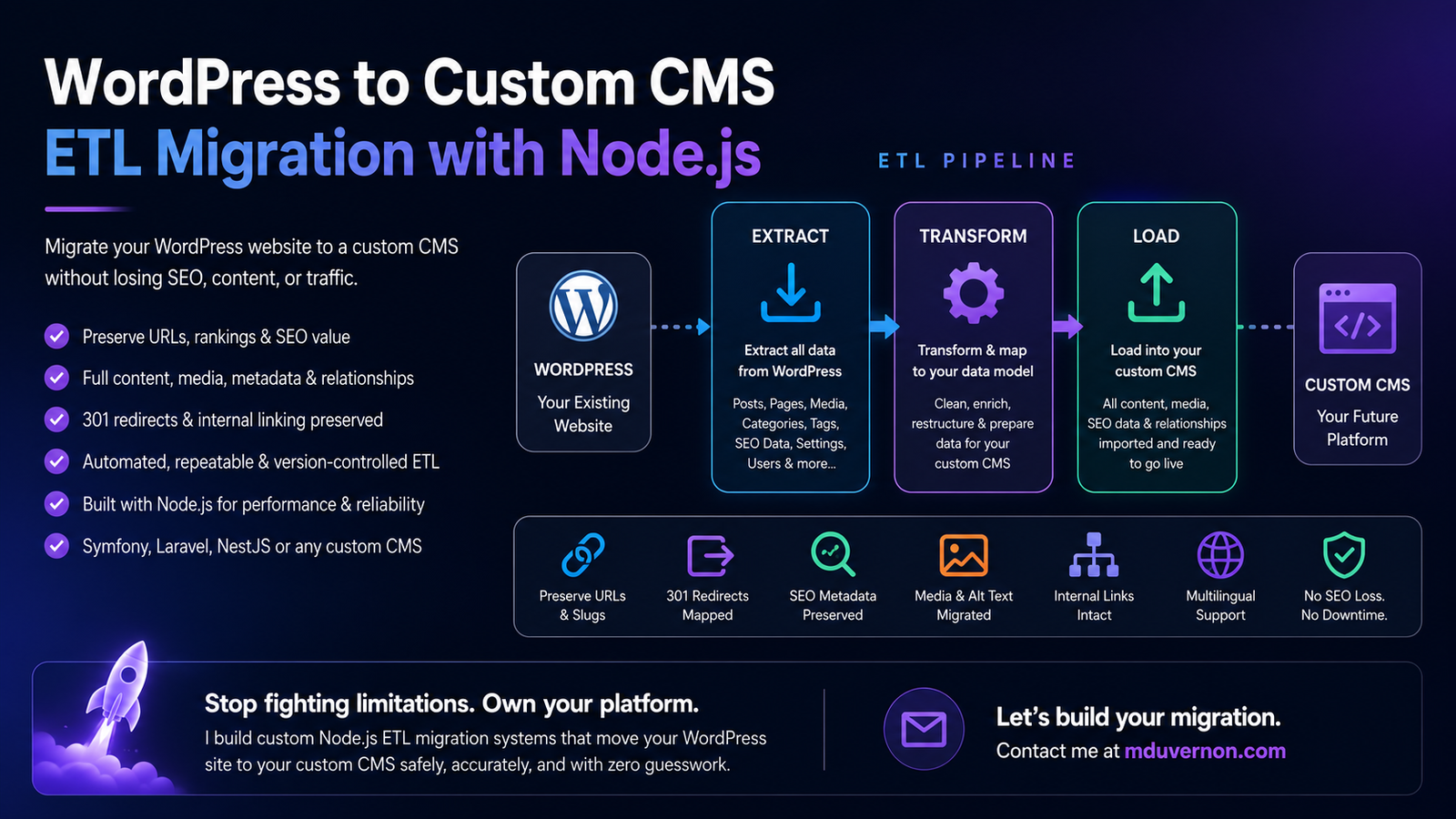
I built an ETL (Extract, Transform, Load) migration system.
Instead of thinking about migration as a one-time import, I treated WordPress as a data source.
The ETL pipeline would:
- Extract every piece of content from WordPress—posts, pages, categories, tags, media, menus, SEO metadata, redirects, and relationships.
- Transform that data into the structure of my own domain model, cleaning inconsistencies, enriching metadata, generating missing fields, and preserving SEO-critical information.
- Load everything into my custom CMS while maintaining URLs, slugs, internal links, images, and relationships.
Because the process was automated, I could run it repeatedly.
Every improvement to the migration logic benefited every website.
If I discovered a bug, I fixed the ETL—not the content.
If I added a new feature to my CMS, I updated the transformation step and migrated again.
The migration became deterministic, repeatable, and version-controlled, just like the rest of my software.
At that point, WordPress was no longer the platform running my business.
It had become just another data provider feeding a system designed specifically for my needs.
Why Build a Custom CMS?
One of the biggest misconceptions about building a custom CMS is that you're trying to recreate WordPress.
That was never my objective.
WordPress is designed to solve the publishing needs of millions of websites. It has to support countless industries, workflows, themes, plugins, and user expectations.
My CMS only has to solve one problem:
Mine.
I wasn't looking for a platform that could do everything.
I wanted one that did exactly what my business required—and nothing more.
That means every feature has a purpose.
Every database table exists because I use it.
Every API serves a real workflow.
Every screen is designed around how I work, not around what a generic website might need.
As a result, there's no legacy code to work around.
No unnecessary plugins to install.
No page builders I'll never use.
No endless configuration pages.
No features added simply because they might be useful to someone else.
The system stays intentionally small, focused, and easy to evolve.
More importantly, I own the architecture.
If I want to integrate AI into my publishing workflow, I build it.
If I need better SEO tooling, I add it directly to the content model.
If I want Pinterest automation, affiliate management, or an entirely new publishing workflow, I don't wait for a plugin developer to support it—I design it exactly the way I need it.
That's the biggest advantage of building your own CMS.
You're no longer adapting your business to someone else's software.
You're building software that adapts to your business.
Of course, that naturally raises another question:
If WordPress already powers millions of websites, why invest the time to build an entirely new CMS?
The answer goes far beyond performance or avoiding plugins. It's about architecture, long-term scalability, automation, and complete ownership of the publishing platform.
I dive into that journey in a separate article:
There, I explain the technical and business decisions behind my CMS, what problems I wanted to solve, why I chose Symfony and React, and why I believe owning your platform can become a long-term competitive advantage for developers building content businesses.
The Biggest Fear: Losing SEO
The moment you tell someone you're migrating away from WordPress, the first question is almost always the same:
"But what about your SEO?"
It's a fair question.
After months—or even years—of publishing content, earning backlinks, and climbing the search results, the last thing you want is to lose everything because of a migration.
The good news is that migrating to a custom CMS doesn't automatically hurt your SEO.
A poorly planned migration does.
One of the first things I did before writing a single line of migration code was create a complete inventory of my WordPress website.
Every page.
Every post.
Every category.
Every image.
Every permalink.
Every piece of SEO metadata.
I needed to know exactly what already existed before I could recreate it elsewhere.
Start by Mapping Every URL
URLs are one of your website's most valuable SEO assets.
Search engines have already discovered them.
They may have backlinks pointing to them.
Users may have bookmarked them.
Other websites may reference them.
Changing URLs without a plan forces search engines to rediscover your content from scratch—and that's a risk you don't need to take.
That's why my ETL migration doesn't simply import content.
It begins by mapping every WordPress URL to its future destination.
For every page in WordPress, I determine one of three outcomes:
- Keep the exact same URL. This is always the preferred option.
- Map it to a new URL if the content structure has evolved.
- Redirect it permanently (301) when a URL genuinely needs to change.
This URL mapping becomes the backbone of the migration.
It's not an afterthought; it's a first-class piece of data that the ETL pipeline uses throughout the import process.
Because every page already has a defined destination before the migration begins, there are no surprises once the new CMS goes live.
SEO Is More Than Just URLs
A URL is only one part of the equation.
A successful migration also preserves everything that gives a page its search value:
- Meta titles and descriptions
- Canonical URLs
- Structured data
- Open Graph metadata
- Internal links
- Image alt text
- Categories and taxonomies
- Publication dates
- Redirects
- Sitemap entries
- Hreflang information for multilingual websites
These elements are extracted from WordPress, transformed to fit my own content model, and loaded into the new CMS alongside the content itself.
Google Doesn't Rank WordPress
One of the biggest misconceptions is that WordPress somehow has an SEO advantage simply because it's WordPress.
It doesn't.
Google doesn't rank CMSs.
It ranks pages.
If your content remains accessible, your URLs are preserved or properly redirected, your metadata is intact, and your technical SEO signals remain consistent, Google has very little reason to treat your new website differently.
The technology behind your website can change completely.
What matters is that, from Google's perspective, the experience remains consistent.
That's why my migration strategy wasn't built around moving blog posts.
It was built around preserving every SEO signal that those blog posts had accumulated over time.
The SEO Assets You Must Preserve
One of the biggest mistakes you can make during a CMS migration is assuming that your content is all that matters.
It isn't.
An article is only one part of what Google has indexed over the years.
Every page accumulates dozens of SEO signals that help search engines understand its relevance, authority, and relationship to the rest of your website. Losing those signals can be just as damaging as losing the content itself.
That's why, before migrating a single page, I built a complete inventory of my WordPress website.
My ETL process doesn't simply extract posts and pages—it extracts the entire SEO context surrounding them.
Think of it as creating a digital blueprint of your website before rebuilding it.
Build a Complete SEO Inventory
Your migration should preserve, or intentionally replace, every important SEO asset, including:
- URLs and permalink structure
- Slugs and page paths
- Parent-child page hierarchy
- Categories and taxonomies
- Tags
- Internal links and cross-references
- Canonical URLs
- Meta titles
- Meta descriptions
- Open Graph and social sharing metadata
- X (Twitter) Card metadata
- Robots directives
- Structured data (Schema.org)
- Breadcrumb hierarchy
- XML sitemap information
- Hreflang and multilingual relationships
- Image filenames
- Image alt text, captions, and metadata
- Publication dates
- Last modified dates
- Author information
- Reading time (if applicable)
- Redirect rules
- Custom SEO fields provided by plugins such as Yoast SEO or Rank Math
Some of these elements are visible to visitors.
Many are not.
But search engines use all of them to better understand your content.
Treat SEO as Data, Not Configuration
One lesson I learned during this migration is that SEO shouldn't live inside plugin settings.
It should be part of your content model.
That's exactly how my ETL works.
Instead of copying plugin configurations, it extracts the underlying SEO information, transforms it into a CMS-independent format, and stores it directly alongside each page.
Once imported, every page already knows its:
- Canonical URL
- Metadata
- Social sharing information
- Sitemap configuration
- Translation mappings
- SEO settings
- Structured data
No plugin is required to "rebuild" those values after the migration.
They're already part of the content.
The Goal Is Continuity
A successful migration isn't about copying WordPress.
It's about making the new website look as familiar as possible to search engines.
When Google revisits your pages after the migration, it should recognize the same URLs, the same metadata, the same relationships, and the same content it indexed before.
If you've preserved those signals correctly, the migration becomes almost transparent from an SEO perspective.
That's exactly what an ETL-based migration enables.
Rather than manually recreating SEO settings page by page, the entire SEO history of your website is carried forward automatically, ensuring that years of optimization continue to benefit your new CMS.
URLs Matter More Than Your CMS
If there's one lesson to remember from this entire migration, it's this:
Your URLs are one of the most valuable assets your website owns.
They've been crawled by search engines.
They're indexed in Google.
They've accumulated backlinks from other websites.
They've been shared on social media.
They appear in browser bookmarks, newsletters, forums, and countless places across the web.
Changing them without a good reason is like changing the address of your business without telling your customers.
Preserve URLs Whenever You Can
One of the primary objectives of my ETL migration was simple:
Preserve every URL whenever possible.
If a WordPress page already has a clean, SEO-friendly URL, there's no reason to change it simply because the technology behind the website has changed.
For example, if WordPress serves:
/best-baby-carriersthen my custom CMS should serve:
/best-baby-carriers—not:
/blog/posts/124or
/article?id=42or any other framework-generated route.
The visitor shouldn't notice that the CMS has changed.
Ideally, neither should Google.
Your ETL Should Map Every URL
This is another reason I chose an ETL-based migration instead of a simple content import.
During the extraction phase, every WordPress URL is recorded and associated with its corresponding content.
During the transformation phase, the ETL determines whether that URL can be preserved exactly or whether it needs to be mapped to a new destination.
Finally, during the loading phase, the CMS receives not only the page content but also its URL history, allowing redirect rules to be generated automatically whenever they're required.
By treating URLs as first-class data instead of rebuilding them later, the migration becomes far more reliable and predictable.
Slugs Are Part of Your SEO Identity
A URL isn't just a technical identifier.
It's part of your content's identity.
A well-crafted slug communicates the topic to both users and search engines.
It often appears in search results, browser address bars, shared links, and analytics reports.
That's why my migration preserves:
- Original slugs
- Complete permalink structure
- Parent-child URL hierarchy
- Language-specific URLs
- Canonical URLs
- Existing redirect mappings
Only when there's a genuine SEO or content reason do I change a URL—and when I do, the old URL is permanently redirected to the new one.
The Less Google Has to Relearn, the Better
Every unnecessary URL change creates additional work for search engines.
Google has to discover the new address, process redirects, transfer ranking signals, update its index, and eventually understand that the page hasn't really changed.
Why force it to do all that work?
A successful migration should change the technology, not the identity of your content.
If your URLs remain stable, your metadata is preserved, and your pages continue delivering the same value, the migration becomes almost invisible to both users and search engines.
That's exactly the outcome you should aim for.
Redirect Everything You Can't Preserve
In an ideal migration, every URL remains exactly the same.
In reality, that's not always possible.
Maybe you've redesigned your content architecture.
Maybe you've merged several articles into a more comprehensive guide.
Maybe you've renamed categories, simplified your URL structure, or removed outdated content altogether.
Those are perfectly valid reasons to change URLs.
The important part isn't avoiding change—it's managing it correctly.
Every Old URL Needs a New Home
One principle guided my migration from beginning to end:
No valuable URL should simply disappear.
Every URL extracted from WordPress is evaluated during the ETL process.
For each one, I decide whether to:
- Preserve the URL exactly as it is.
- Redirect it to a newer equivalent page.
- Redirect it to a broader, more authoritative article if the original content has been consolidated.
- Return a 410 (Gone) only when the content has been intentionally removed and no meaningful replacement exists.
This decision is made before the migration takes place—not after users start finding broken links.
Build Redirects Into Your ETL
Because my migration is ETL-based, redirects aren't managed manually.
They're generated as part of the transformation process.
The ETL already knows:
- The original WordPress URL.
- The destination URL in the new CMS.
- Whether the page has been renamed, moved, merged, or deleted.
That means redirect rules can be created automatically and consistently across the entire website.
Instead of maintaining hundreds or thousands of redirects by hand, they're produced directly from the migration mapping.
For large websites, this approach is dramatically more reliable and easier to maintain.
Use Permanent (301) Redirects
When a page has moved permanently, use a 301 redirect.
A 301 tells browsers and search engines that the content has a new permanent location and that ranking signals should gradually be transferred to the new URL.
Just as importantly, users who follow an old bookmark or click a link from another website will still arrive at the content they expected.
From their perspective, nothing appears broken.
Redirect With Purpose
A common migration mistake is redirecting every missing page to the homepage.
It may seem convenient, but it creates a poor experience for both visitors and search engines.
Instead, every redirect should have a clear destination.
A page about baby carriers should redirect to the updated baby carrier guide—not to the homepage.
An affiliate product should redirect to its replacement—not to a generic category.
An old category page should redirect to the most relevant new taxonomy—not to an unrelated section of the site.
Think in terms of content continuity, not convenience.
Redirects Preserve More Than Traffic
Good redirects do much more than prevent 404 errors.
They help preserve years of accumulated SEO value:
- Existing backlinks continue to provide value.
- Search engines can transfer ranking signals more efficiently.
- Visitors using old bookmarks still reach the correct content.
- Internal and external references remain useful.
- Search engines understand how your website has evolved.
In other words, redirects are the bridge between your old website and your new one.
When your ETL pipeline treats redirects as part of the migration—not as a cleanup task afterward—you significantly reduce the risk of losing hard-earned SEO authority during the transition.
Preserve Your Internal Linking Structure
When people think about SEO migrations, they usually focus on URLs and redirects.
Internal links often receive far less attention.
That's a mistake.
Your internal linking strategy is one of the strongest signals you control. It tells search engines how your content is organized, which pages are most important, and how different topics relate to one another.
For visitors, it creates a natural journey through your content.
For search engines, it provides the roadmap used to discover and understand your website.
Internal Links Are Part of Your Content
During my migration, I didn't treat internal links as something to fix after importing the content.
They became part of the ETL process itself.
As pages are extracted from WordPress, every internal link is analyzed.
During the transformation phase, those links are matched against the new content model and updated automatically whenever a URL changes.
By the time the content is loaded into the new CMS, every article already references the correct destination.
This eliminates countless hours of manual editing while dramatically reducing the risk of broken links.
More Than Just Article Links
A successful migration should preserve every navigational relationship across the website, including:
- Links between related articles
- Contextual links within page content
- Primary and secondary navigation menus
- Breadcrumb navigation
- Category and taxonomy pages
- Pagination between archives
- Author profile links
- Footer navigation
- Image links and media references
- Calls-to-action pointing to other pages
Each of these contributes to how users navigate your website and how search engines crawl it.
Verify Before Going Live
One advantage of an automated ETL pipeline is that link validation can also be automated.
Before publishing the new website, I verify that:
- Every internal URL resolves successfully.
- No links still point to the old WordPress installation.
- Navigation menus reference existing pages.
- Breadcrumbs generate the correct hierarchy.
- Pagination works across archive pages.
- Images and media assets resolve correctly.
- Canonical links point to the expected URLs.
Catching these issues before launch is far easier than discovering them weeks later through Search Console or user reports.
Every Broken Link Is a Missed Opportunity
A single broken internal link may seem insignificant.
Across hundreds or thousands of pages, however, they quickly become a crawlability problem.
Search engines waste crawl budget following dead links.
Users encounter unnecessary friction.
Link equity stops flowing naturally through your content.
The result is a website that's harder to navigate, harder to crawl, and ultimately harder to rank.
That's why internal links deserve the same level of attention as URLs and redirects.
A migration shouldn't just preserve your pages—it should preserve the relationships between them.
Those relationships are what transform a collection of individual articles into a well-structured, authoritative website.
Don't Forget Your Images
Images contribute much more to SEO than many people realize.
When migrating:
- preserve filenames whenever possible
- keep alt text
- migrate captions
- maintain image dimensions
- generate modern formats like WebP or AVIF
- compress intelligently
- preserve image URLs if possible
For content-heavy websites, image search can represent a meaningful traffic source.
Rebuild Metadata Correctly
A custom CMS gives you something WordPress rarely provides:
Complete control.
Your content model should explicitly include fields such as:
- SEO title
- meta description
- canonical URL
- Open Graph title
- Open Graph description
- robots settings
- sitemap priority
- change frequency
- schema type
- focus keyword
- breadcrumbs
Instead of relying on plugins to inject SEO metadata, it becomes part of your data model.
That's a much cleaner architecture.
Build an SEO-First Content Model
When I designed my CMS, SEO wasn't an afterthought.
It became part of every page.
Each article contains structured fields for:
- metadata
- translations
- canonical URLs
- Open Graph
- schema.org
- social sharing
- reading time
- keywords
- publication workflow
- image management
Instead of asking "Which plugin handles this?"
I simply ask:
"Which property belongs to this content?"
That's a much healthier design philosophy.
Test Before You Switch
Never migrate directly into production.
Instead:
- Crawl the WordPress website.
- Export every URL.
- Import all content.
- Compare page counts.
- Validate metadata.
- Test redirects.
- Validate schema markup.
- Check canonical URLs.
- Test mobile rendering.
- Generate the new sitemap.
Only after everything matches should you switch DNS.
Monitor Everything After Launch
Migration isn't finished when the website goes live.
It's just entering its monitoring phase.
During the first few weeks, watch:
- crawl errors
- 404 pages
- Search Console coverage
- indexing reports
- Core Web Vitals
- organic traffic
- impressions
- rankings
- server logs
Small issues discovered early are easy to fix.
Months later, they're much harder to trace.
Why I'm Never Going Back
Building my own CMS was never about proving that I could replace WordPress.
It was about building software that aligns with the way I work and the businesses I want to create.
Today, every feature in my platform exists because it solves a real problem.
Not because a plugin happened to implement it.
Not because a theme expected it.
Not because millions of other websites might find it useful.
Because I need it.
If I want to integrate AI into my editorial workflow, I build it.
If I need a better SEO data model, I design it.
If I want Pinterest automation, affiliate product synchronization, multilingual publishing, or a completely new content workflow, I don't wait for a third-party plugin or hope someone has already solved the problem.
I simply add it to my platform.
The biggest benefit isn't technical.
It's freedom.
Every improvement I make today automatically benefits every affiliate website, blog, e-commerce store, and future project built on the same CMS.
Instead of maintaining dozens of WordPress installations independently, I'm continuously improving a single publishing platform that grows with my business.
The Biggest Lesson
The most important lesson I learned from this migration wasn't how to move content.
It was how to think about content.
Your CMS shouldn't dictate how your business operates.
Your business should dictate how your CMS is built.
Once that mindset changes, every architectural decision becomes much simpler.
Instead of asking:
"Which plugin should I install?"
You start asking:
"How should my platform solve this problem?"
That's a completely different way of building software.
A Custom CMS Isn't for Everyone
To be clear, I don't think everyone should abandon WordPress.
If your goal is to launch a blog this weekend, WordPress remains an excellent choice.
But if you're a software developer, an agency, or a company building multiple SEO-driven websites, affiliate platforms, publishing systems, or content-heavy applications, there comes a point where owning your platform becomes a strategic advantage.
A custom CMS gives you complete control over:
- Your content model
- Your SEO architecture
- Your APIs
- Your automation workflows
- Your publishing pipeline
- Your integrations
- Your long-term roadmap
You stop working around platform limitations and start building exactly what your business needs.
That's a powerful position to be in.
Need to Migrate WordPress to a Custom CMS?
If you're planning to leave WordPress but don't want to lose years of SEO work, manually copying content isn't the answer.
A well-designed ETL (Extract, Transform, Load) pipeline can migrate your entire website while preserving the SEO signals that matter:
- URLs and permalink structure
- Redirect mappings
- Pages and blog posts
- Categories and taxonomies
- Images and media
- SEO metadata (Yoast, Rank Math, etc.)
- Internal links
- Multilingual content
- Structured data
- And much more...
I specialize in building custom Node.js/TypeScript ETL migration systems that move content from WordPress into modern CMS platforms such as Symfony, Laravel, NestJS, custom Node.js applications, or any architecture with an API or database.
Rather than delivering a one-off migration script, I build repeatable, version-controlled migration pipelines that can be executed multiple times, making them ideal for testing, incremental migrations, staging environments, and future platform evolution.
Whether you're building a custom CMS from scratch or modernizing an existing platform, I can help you migrate safely while preserving your hard-earned SEO.
If that sounds like the kind of migration you're planning, feel free to get in touch. I'd be happy to discuss your project and help you design a migration strategy that puts your content—not your CMS—at the center of your business.