
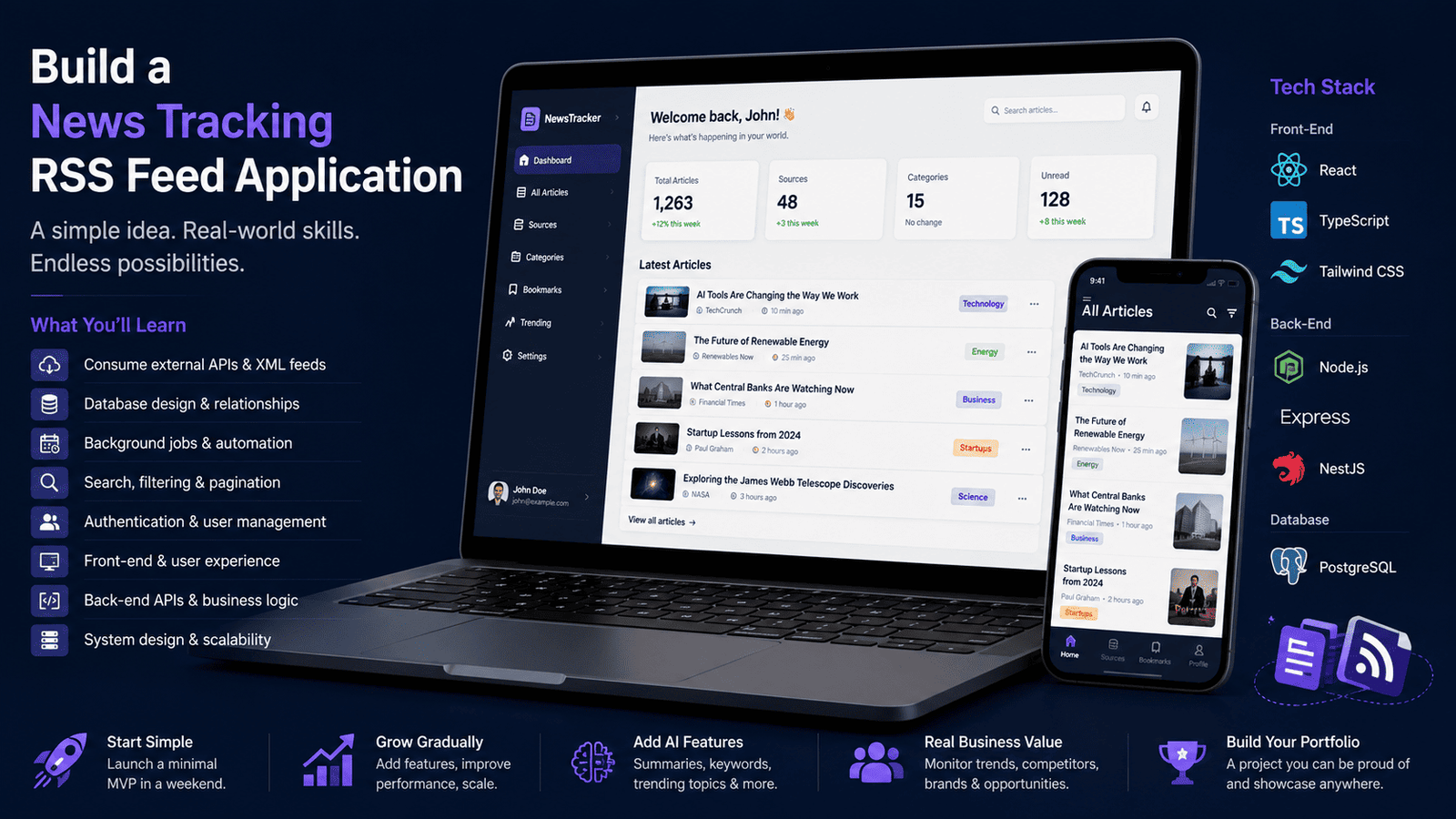
As a Beginner Developer (Junior), My First Project Would Be a News Tracking RSS Feed
Starting a career in software development can feel overwhelming. There are countless technologies to learn, frameworks to explore, and project ideas competing for your attention. Many junior developers jump straight into building social networks, e-commerce platforms, or complex SaaS products, only to become frustrated when the project becomes too large to manage.
If I were starting over today as a junior developer, my very first serious project would be a News Tracking RSS Feed application.
Not because it's flashy.
Not because it's trendy.
But because it teaches nearly every fundamental skill a developer needs without becoming overwhelmingly complex.
Why an RSS Feed Tracker?
A news tracking platform sits in a sweet spot between simplicity and real-world usefulness.
One of the biggest mistakes beginner developers make is choosing projects that are either too simple to teach meaningful skills or so ambitious that they never get finished. A news tracking RSS feed application sits perfectly between those two extremes.
At its core, the project only needs to:
- Fetch RSS feeds
- Parse content
- Store articles
- Display information to users (you, as it's for yourself)
Yet behind those simple requirements lies a surprising number of valuable engineering concepts.
There is another reason why I believe this project is particularly valuable:
- Staying informed (and focused) has become a competitive advantage.
Whether you're a developer, entrepreneur, marketer, investor, freelancer, or business owner, the ability to quickly discover and process new information can significantly impact your decisions. Technologies evolve, industries change, competitors launch products, algorithms get updated, and new opportunities appear every day.
The people who consistently stay informed are often the ones who identify trends before everyone else.
As developers, this is especially important. New frameworks emerge, security vulnerabilities are discovered, programming languages evolve, cloud providers release new services, and AI tools continuously reshape the way software is built. Keeping up with these changes can directly influence your career growth and the quality of the solutions you deliver.
A news tracking platform helps solve this problem by centralizing information from multiple sources into a single place. Instead of manually visiting dozens of websites every day, you can aggregate content automatically and focus only on what matters.
However, behind each of these seemingly simple requirements lies an entire set of skills that developers use every day.
When fetching RSS feeds, you'll learn how applications communicate with external systems. You'll discover how to make HTTP requests, handle network failures, manage response formats, and deal with services that don't always behave as expected. Suddenly, you're working with real-world data rather than static JSON files or hardcoded examples.
Parsing feed content introduces another layer of complexity. RSS feeds are typically delivered as XML, which means you'll learn how structured data formats work and how to transform external information into data your application can understand. You'll also encounter edge cases such as missing fields, malformed feeds, duplicate articles, and inconsistent metadata.
Once the data is available, it must be stored somewhere. This naturally introduces database design concepts. You'll start thinking about how articles relate to publishers, categories, tags, authors, and users. Questions that initially seem trivial become opportunities to learn about data modeling, relationships, indexing, and performance optimization.
Displaying the information to users may sound like the easiest part, but it introduces its own challenges. How should articles be organized? How should users search through thousands of entries? How do you paginate results efficiently? What information should be shown in previews versus detail pages? These questions force you to think like a product developer rather than simply a programmer.
As the application grows, you'll begin noticing opportunities for improvement. Users might want notifications when new articles appear. They may want custom categories, saved searches, or personalized feeds. Suddenly you're exploring authentication, background jobs, scheduling systems, caching strategies, and user preferences.
This is where the RSS tracker becomes particularly valuable as a learning project.
Unlike many tutorial applications that exist only for educational purposes, a news tracker solves a real problem. Businesses use similar systems to monitor competitors, marketers use them to discover content opportunities, investors use them to follow industries, and researchers use them to track information sources. In many ways, information has become a form of leverage. The faster you can access, organize, and understand it, the better positioned you are to make informed decisions.
Even better, the project can evolve alongside your skills. A beginner can build a basic RSS reader in a few weeks, while a more experienced developer can transform the same foundation into a sophisticated content intelligence platform with AI-powered summarization, trend analysis, keyword extraction, sentiment detection, and automated reporting.
Few projects offer such a smooth progression from beginner concepts to advanced engineering challenges.
That's why an RSS feed tracker is such a powerful first project. It starts simple enough to be achievable, provides immediate personal value by helping you stay informed, and contains enough depth to teach lessons that remain relevant throughout an entire software development career.
You May Discover Markets You Never Knew Existed
One of the most underrated benefits of building a news tracking platform is that it can expose you to entirely new markets and industries you might never have explored otherwise.
As you aggregate articles from different sources, you'll naturally come across emerging technologies, niche businesses, new investment opportunities, and growing industries that rarely receive mainstream attention. A single article can lead you down a rabbit hole of discovery, introducing you to markets you didn't even know existed.
Many successful businesses are built by people who identify opportunities before they become obvious. By consistently monitoring diverse sources of information, you increase your chances of spotting new trends, underserved audiences, innovative business models, or fast-growing niches long before they become saturated.
For entrepreneurs, this can inspire entirely new product ideas. For developers, it can reveal industries in need of better software. For marketers, it can uncover untapped content opportunities. And for investors, it can highlight sectors showing early signs of growth.
In other words, your RSS tracker becomes more than a news reader—it becomes a discovery engine. The more high-quality information flows through your platform, the greater the chance that you'll stumble upon an opportunity capable of changing the direction of your next project, career, or business.
It Can Replace Doom Scrolling With Intentional Learning
Many of us have developed the habit of opening social media whenever we have a few spare minutes. We scroll endlessly through short videos, memes, viral posts, and endless debates, only to realize twenty or thirty minutes have disappeared without learning anything particularly useful.
A news tracking platform offers a healthier alternative.
Instead of consuming whatever an algorithm decides to show you, you choose the topics, industries, and sources that deserve your attention. Every time you open your application, you're intentionally learning about subjects that can improve your career, business, or personal interests.
Over time, this small habit compounds. Fifteen minutes spent reading high-quality articles about software engineering, artificial intelligence, entrepreneurship, finance, cybersecurity, or your own industry can be far more valuable than an hour of mindless scrolling.
That's not to say social media has no value—it can be an excellent place to discover ideas, connect with people, and follow industry leaders. The problem is that its business model is designed to maximize your attention, not necessarily your learning.
By building and using your own RSS tracker, you take back control of your information diet. Instead of being pulled into an endless feed optimized for engagement, you create a personalized stream optimized for knowledge. In the long run, that simple shift can have a surprisingly large impact on your productivity, the quality of your decisions, and the opportunities you discover.
You Decide Who Deserves Your Attention
One of the biggest differences between an RSS reader and most social media platforms is simple: you decide who to follow.
On social media, algorithms are designed to maximize engagement. They continuously decide what appears in your feed based on what is most likely to keep you scrolling. While this can occasionally surface interesting content, it also means your attention is constantly being influenced by a system whose goals don't necessarily align with your own.
An RSS tracker puts that decision back in your hands.
You choose every publication, blog, newsletter, company, creator, and industry expert that appears in your feed. Nothing is injected because it's trending. Nothing goes viral simply because an algorithm decided it should. If a source no longer provides value, you remove it. If you discover someone consistently producing high-quality content, you add them.
Over time, you build an information ecosystem that reflects your own goals instead of someone else's engagement metrics.
This level of control is incredibly valuable. Whether you're trying to become a better developer, entrepreneur, marketer, investor, or simply stay informed about a particular industry, you can curate a stream of information tailored to your interests and filter out the noise. Instead of fighting an algorithm for your attention, you create an environment designed to help you learn, grow, and make better decisions every day.
You'll Learn How to Consume External Data
One of the most common responsibilities in professional software development is integrating with third-party systems. Whether it's a payment gateway, a social network, an AI service, or a business API, developers constantly work with data they don't control.
An RSS feed tracker introduces this concept early.
To collect articles, you'll need to:
- Make HTTP requests
- Handle timeouts and connection errors
- Process XML data
- Validate responses
- Manage duplicate content
- Deal with malformed or incomplete feeds
These may sound like small challenges, but they're exactly the kinds of problems developers face in production environments every day.
Unlike tutorial projects that rely on static or fake data, an RSS tracker works with live information from real websites. Some feeds will be fast, others slow. Some will be perfectly formatted, while others will contain missing fields or invalid data.
Learning to handle these situations teaches an important lesson: real-world software must expect things to go wrong.
By building an RSS reader, you'll gain hands-on experience consuming external data, handling failures gracefully, and transforming information into something your application can use—skills that are valuable in virtually every modern software project.
You'll Learn Web Scraping When RSS Isn't Available
Not every website offers an RSS feed or a public API. If there's valuable information you want to monitor, you'll eventually encounter sites that provide no easy way to access their content.
This is where you'll discover web scraping.
You'll learn how to retrieve web pages, parse HTML, extract relevant information, and deal with real-world challenges such as changing page structures, pagination, duplicate detection, rate limiting, and anti-bot protections. You'll also learn the importance of respecting websites' terms of service and using scraping responsibly.
Suddenly, your application is no longer limited to RSS feeds. It can collect information from blogs, documentation websites, product announcements, company newsrooms, job boards, public reports, and countless other sources that don't expose structured feeds.
More importantly, you'll begin to understand an important engineering principle: there is often more than one way to integrate with external data. Sometimes you'll consume an API. Sometimes you'll parse an RSS feed. And sometimes you'll build a scraper to collect publicly available information when no structured interface exists.
These are practical skills used every day by search engines, price comparison platforms, market intelligence tools, competitor monitoring services, and many other real-world applications. Learning when and how to use each approach will make you a much more versatile developer.
You'll Learn Database Design
News articles don't simply appear on the screen—they need to be stored, organized, and retrieved efficiently.
A news tracking project naturally introduces you to database design through real-world concepts such as:
- Articles
- Sources
- Categories
- Tags
- Authors
- User subscriptions
As the project grows, you'll start thinking about how these entities relate to one another. Can an article belong to multiple categories? Should tags be reusable? How do you track which articles a user has already read?
These questions force you to move beyond simply writing code and start designing data structures that make sense.
This is often the point where junior developers begin to understand that software development isn't just about building features—it's also about modeling information in a way that's scalable, maintainable, and easy to work with over time.
You'll Discover the Importance of Automation
Once your application starts working, you'll quickly realize something:
Nobody wants to manually click a button every hour to fetch new articles.
To keep content fresh, the system needs to update itself automatically. This naturally introduces concepts such as:
- Scheduled jobs
- Cron tasks
- Background workers
- Queues
- Automated imports
These are essential building blocks of modern software. Most production applications perform countless tasks behind the scenes without user intervention, from sending emails and processing payments to generating reports and synchronizing data.
An RSS tracker is a great way to learn automation because the use case is simple and easy to understand. Instead of manually fetching feeds, your application can periodically check for new content, process it, and make it available to users automatically.
By implementing these features, you'll gain experience with the kind of background processes that power real-world applications every day.
Search Changes Everything
When your application contains only a few dozen articles, browsing is easy.
But once you accumulate hundreds or thousands of articles, finding specific information becomes much harder. Users no longer want to scroll endlessly—they want to search.
Adding search functionality introduces several important concepts:
- Text indexing
- Filtering
- Sorting
- Pagination
- Query optimization
What starts as a simple search box quickly becomes a lesson in performance and user experience. You'll begin thinking about how data is stored, how queries are executed, and how to return results quickly even as your dataset grows.
This is often where developers start to appreciate the importance of database design and efficient querying. As applications scale, performance becomes just as important as functionality, and search is one of the best ways to learn that lesson firsthand.
You Can Add AI Features Later
A great beginner project shouldn't stop being useful once you've learned the basics. It should be able to grow alongside your skills.
That's one of the biggest advantages of an RSS tracking platform.
Once you have articles flowing through your system, AI can be introduced in many practical ways:
- Generate article summaries
- Extract keywords automatically
- Categorize content intelligently
- Detect trending topics
- Create daily news digests
- Generate social media posts
These features transform a simple news reader into a content intelligence platform.
The best part is that you don't need AI from day one. You can start with a basic application that fetches and displays articles, then gradually add more advanced capabilities as you become comfortable with APIs, machine learning services, and automation.
This allows the project to remain valuable long after you've mastered the fundamentals, giving you a realistic path from junior-level development concepts to modern AI-powered applications.
You'll Become a Full-Stack Developer
One of the biggest advantages of building an RSS tracking platform is that it naturally exposes you to both front-end and back-end development.
On the front end, you'll build interfaces that allow users to browse articles, search content, apply filters, manage subscriptions, and view personalized dashboards. You'll learn how to display data effectively and create a user experience that feels intuitive and responsive.
On the back end, you'll be responsible for fetching RSS feeds, processing data, storing articles, exposing APIs, managing authentication, handling business logic, and running background jobs that keep the platform updated.
Unlike many beginner projects that focus on only one side of development, an RSS tracker requires both. You'll see how data moves through the entire system—from an external news source, through your database and APIs, all the way to the user interface.
By the end of the project, you'll have experience with the complete application lifecycle and a much better understanding of how modern web applications are built. That's why this type of project is such an excellent foundation for anyone who wants to become a full-stack developer.
Technologies I Would Use
If I were learning web development today, I would focus on technologies that are widely used in the industry, have strong communities, and allow me to build both small projects and production-grade applications.
Front-End
For the user interface, I would choose:
- React for building modern, component-based interfaces
- TypeScript for type safety and better code maintainability
- Tailwind CSS for rapidly creating responsive and professional-looking designs
This combination is extremely popular and provides an excellent foundation for modern front-end development.
Back-End
For the server-side application, I would use:
- Node.js as the runtime environment
- Express to learn the fundamentals of web APIs and server architecture
Once comfortable with the basics, I would explore:
- NestJS for larger applications that benefit from dependency injection, modular architecture, and enterprise-grade patterns
Database
For data storage, I would choose:
- PostgreSQL
PostgreSQL is one of the most widely used relational databases in the world. It is reliable, powerful, open-source, and capable of supporting applications ranging from small personal projects to large-scale enterprise systems.
Additional Tools Worth Learning
As the project grows, I would also introduce:
- Git for version control
- GitHub for collaboration and source code hosting
- Docker for reproducible development environments
- Redis for caching and queues
- GitHub Actions for CI/CD and automation
The goal isn't to learn every technology at once. The goal is to build a solid foundation while working on a project that naturally introduces new concepts as it evolves. By the time the RSS tracker reaches a mature state, you'll have gained experience with many of the tools and practices used by professional full-stack developers every day.
Final Thoughts
A News Tracking RSS Feed application may not sound as exciting as the next AI startup, social media platform, or billion-dollar SaaS idea. That's precisely why it's such a great first project.
The goal of a beginner project isn't to impress investors or reinvent an industry. The goal is to learn by building something useful, achievable, and capable of growing alongside your skills.
An RSS tracking platform checks all of those boxes.
Along the way, you'll gain practical experience with:
- Consuming external APIs and data sources
- Database design and data modeling
- Background jobs and automation
- Search and filtering
- Authentication and user management
- Front-end development
- Back-end development
- System architecture and scalability
- AI integrations and content processing
More importantly, you'll be solving a real problem. Staying informed is valuable regardless of your profession, and the application you build can become a tool you genuinely use every day.
What starts as a simple feed reader can gradually evolve into a content intelligence platform capable of monitoring industries, tracking competitors, identifying trends, generating summaries, and automating content workflows.
That's the hallmark of a great learning project: it doesn't become obsolete once you've finished the tutorial.
It continues to provide value while giving you new opportunities to learn.
If I were a junior developer starting my journey today, I wouldn't focus on building the next unicorn startup. I would focus on building a project that teaches the fundamentals, exposes me to real-world engineering challenges, and remains useful long after the first version is complete.
A News Tracking RSS Feed application does exactly that. It's simple enough to start, powerful enough to grow, and practical enough to become one of the most educational projects a beginner developer can build.